原生模块
你的 React Native 应用代码可能需要与 React Native 或现有库未提供的原生平台 API 交互。你可以使用 Turbo Native Module 自行编写集成代码。本指南将向你展示如何编写一个。
基本步骤如下:
- 使用最流行的 JavaScript 类型注解语言之一:Flow 或 TypeScript,定义一个带类型的 JavaScript 规范;
- 配置你的依赖管理系统以运行 Codegen,它会将规范转换为原生语言接口;
- 使用你的规范编写应用代码;以及
- 使用生成的接口编写你的原生平台代码,将原生代码编写并接入 React Native 运行时环境。
我们将通过构建一个示例 Turbo Native Module 来逐步完成这些步骤。本指南其余部分假设你已通过以下命令创建了应用:
npx @react-native-community/cli@latest init TurboModuleExample --version latest
原生持久化存储
本指南将向你展示如何实现 Web Storage API 的一个实现:localStorage。这个 API 对可能正在你项目中编写应用代码的 React 开发者来说很熟悉。
要在移动端实现这一点,我们需要使用 Android 和 iOS API:
- Android:SharedPreferences,以及
- iOS:NSUserDefaults。
1. 声明带类型的规范
React Native 提供了一个名为 Codegen 的工具,它会读取用 TypeScript 或 Flow 编写的规范,并为 Android 和 iOS 生成平台特定代码。该规范声明了将在你的原生代码与 React Native JavaScript 运行时之间来回传递的方法和数据类型。Turbo Native Module 既包括你的规范、你编写的原生代码,也包括根据你的规范生成的 Codegen 接口。
要创建一个 specs 文件:
- 在应用的根目录中,创建一个名为
specs的新文件夹。 - 创建一个名为
NativeLocalStorage.ts的新文件。
你可以在 附录 文档中查看你的规范中可以使用的所有类型,以及生成的原生类型。
如果你想更改模块名称以及相关 specs 文件,请务必始终使用 Native 作为前缀(例如 NativeStorage 或 NativeUsersDefault)。
下面是 localStorage 规范的一个实现:
- TypeScript
- Flow
import type {TurboModule} from 'react-native';
import {TurboModuleRegistry} from 'react-native';

export interface Spec extends TurboModule {
  setItem(value: string, key: string): void;
  getItem(key: string): string | null;
  removeItem(key: string): void;
  clear(): void;
}

export default TurboModuleRegistry.getEnforcing<Spec>(
  'NativeLocalStorage',
);
import type {TurboModule} from 'react-native';
import {TurboModule, TurboModuleRegistry} from 'react-native';

export interface Spec extends TurboModule {
  setItem(value: string, key: string): void;
  getItem(key: string): ?string;
  removeItem(key: string): void;
  clear(): void;
}
2. 配置 Codegen 运行
该规范会被 React Native Codegen 工具用于为我们生成平台特定的接口和样板代码。为此,Codegen 需要知道在哪里找到我们的规范,以及如何处理它。将你的 package.json 更新为包含以下内容:
     "start": "react-native start",
     "test": "jest"
   },
   "codegenConfig": {
     "name": "NativeLocalStorageSpec",
     "type": "modules",
     "jsSrcsDir": "specs",
     "android": {
       "javaPackageName": "com.nativelocalstorage"
     }
   },
   "dependencies": {
在 Codegen 全部接入后,我们需要准备原生代码以接入生成的代码。
- Android
- iOS
Codegen 通过 generateCodegenArtifactsFromSchema Gradle 任务执行:
cd android
./gradlew generateCodegenArtifactsFromSchema

BUILD SUCCESSFUL in 837ms
14 actionable tasks: 3 executed, 11 up-to-date
这会在你构建 Android 应用时自动运行。
Codegen 作为 CocoaPods 自动添加到项目中的脚本阶段的一部分运行。
cd ios
bundle install
bundle exec pod install
输出会类似于:
...
Framework build type is static library
[Codegen] Adding script_phases to ReactCodegen.
[Codegen] Generating ./build/generated/ios/ReactCodegen.podspec.json
[Codegen] Analyzing /Users/me/src/TurboModuleExample/package.json
[Codegen] Searching for codegen-enabled libraries in the app.
[Codegen] Found TurboModuleExample
[Codegen] Searching for codegen-enabled libraries in the project dependencies.
[Codegen] Found react-native
...
3. 使用 Turbo Native Module 编写应用代码
使用 NativeLocalStorage,这里是一个修改后的 App.tsx,其中包含我们想要持久化的一些文本、一个输入框以及一些用于更新该值的按钮。
TurboModuleRegistry 支持两种获取 Turbo Native Module 的模式:
get<T>(name: string): T | null:如果 Turbo Native Module 不可用,则返回null。getEnforcing<T>(name: string): T:如果 Turbo Native Module 不可用,则抛出异常。此方式假设该模块始终可用。
import {useEffect, useState, type JSX} from 'react';
import {
  SafeAreaView,
  StyleSheet,
  Text,
  TextInput,
  Button,
} from 'react-native';

import NativeLocalStorage from './specs/NativeLocalStorage';

const EMPTY = '<empty>';

function App(): JSX.Element {
  const [value, setValue] = useState<string | null>(null);

  const [editingValue, setEditingValue] = useState<string | null>(
    null,
  );

  useEffect(() => {
    const storedValue = NativeLocalStorage?.getItem('myKey');
    setValue(storedValue ?? '');
  }, []);

  function saveValue() {
    NativeLocalStorage?.setItem(editingValue ?? EMPTY, 'myKey');
    setValue(editingValue);
  }

  function clearAll() {
    NativeLocalStorage?.clear();
    setValue('');
  }

  function deleteValue() {
    NativeLocalStorage?.removeItem('myKey');
    setValue('');
  }

  return (
    <SafeAreaView style={{flex: 1}}>
      <Text style={styles.text}>
        当前保存的值是:{value ?? '没有值'}
      </Text>
      <TextInput
        placeholder="输入你想要存储的文本"
        style={styles.textInput}
        onChangeText={setEditingValue}
      />
      <Button title="保存" onPress={saveValue} />
      <Button title="删除" onPress={deleteValue} />
      <Button title="清除" onPress={clearAll} />
    </SafeAreaView>
  );
}

const styles = StyleSheet.create({
  text: {
    margin: 10,
    fontSize: 20,
  },
  textInput: {
    margin: 10,
    height: 40,
    borderColor: 'black',
    borderWidth: 1,
    paddingLeft: 5,
    paddingRight: 5,
    borderRadius: 5,
  },
});

export default App;
4. 编写你的原生平台代码
在一切准备就绪后,我们将开始编写原生平台代码。我们分为两部分来完成:
本指南展示了如何创建一个仅适用于新架构的 Turbo Native Module。如果你需要同时支持新架构和旧架构,请参阅我们的向后兼容指南。
- Android
- iOS
现在是时候编写一些 Android 平台代码,以确保 localStorage 在应用关闭后仍然保留。
第一步是实现生成的 NativeLocalStorageSpec 接口:
- Java
- Kotlin
package com.nativelocalstorage;

import android.content.Context;
import android.content.SharedPreferences;
import com.nativelocalstorage.NativeLocalStorageSpec;
import com.facebook.react.bridge.ReactApplicationContext;

public class NativeLocalStorageModule extends NativeLocalStorageSpec {

  public static final String NAME = "NativeLocalStorage";

  public NativeLocalStorageModule(ReactApplicationContext reactContext) {
    super(reactContext);
  }

  @Override
  public String getName() {
    return NAME;
  }

  @Override
  public void setItem(String value, String key) {
    SharedPreferences sharedPref = getReactApplicationContext().getSharedPreferences("my_prefs", Context.MODE_PRIVATE);
    SharedPreferences.Editor editor = sharedPref.edit();
    editor.putString(key, value);
    editor.apply();
  }

  @Override
  public String getItem(String key) {
    SharedPreferences sharedPref = getReactApplicationContext().getSharedPreferences("my_prefs", Context.MODE_PRIVATE);
    String username = sharedPref.getString(key, null);
    return username;
  }

  @Override
  public void removeItem(String key) {
    SharedPreferences sharedPref = getReactApplicationContext().getSharedPreferences("my_prefs", Context.MODE_PRIVATE);
    sharedPref.edit().remove(key).apply();
  }

  @Override
  public void clear() {
    SharedPreferences sharedPref = getReactApplicationContext().getSharedPreferences("my_prefs", Context.MODE_PRIVATE);
    sharedPref.edit().clear().apply();
  }
}
package com.nativelocalstorage

import android.content.Context
import android.content.SharedPreferences
import com.nativelocalstorage.NativeLocalStorageSpec
import com.facebook.react.bridge.ReactApplicationContext

class NativeLocalStorageModule(reactContext: ReactApplicationContext) : NativeLocalStorageSpec(reactContext) {

  override fun getName() = NAME

  override fun setItem(value: String, key: String) {
    val sharedPref = getReactApplicationContext().getSharedPreferences("my_prefs", Context.MODE_PRIVATE)
    val editor = sharedPref.edit()
    editor.putString(key, value)
    editor.apply()
  }

  override fun getItem(key: String): String? {
    val sharedPref = getReactApplicationContext().getSharedPreferences("my_prefs", Context.MODE_PRIVATE)
    val username = sharedPref.getString(key, null)
    return username.toString()
  }

  override fun removeItem(key: String) {
    val sharedPref = getReactApplicationContext().getSharedPreferences("my_prefs", Context.MODE_PRIVATE)
    val editor = sharedPref.edit()
    editor.remove(key)
    editor.apply()
  }

  override fun clear() {
    val sharedPref = getReactApplicationContext().getSharedPreferences("my_prefs", Context.MODE_PRIVATE)
    val editor = sharedPref.edit()
    editor.clear()
    editor.apply()
  }

  companion object {
    const val NAME = "NativeLocalStorage"
  }
}
接下来我们需要创建 NativeLocalStoragePackage。它通过将我们的模块包装为一个 Base Native Package,提供了一个在 React Native 运行时中注册该模块的对象:
- Java
- Kotlin
package com.nativelocalstorage;

import com.facebook.react.BaseReactPackage;
import com.facebook.react.bridge.NativeModule;
import com.facebook.react.bridge.ReactApplicationContext;
import com.facebook.react.module.model.ReactModuleInfo;
import com.facebook.react.module.model.ReactModuleInfoProvider;

import java.util.HashMap;
import java.util.Map;

public class NativeLocalStoragePackage extends BaseReactPackage {

  @Override
  public NativeModule getModule(String name, ReactApplicationContext reactContext) {
    if (name.equals(NativeLocalStorageModule.NAME)) {
      return new NativeLocalStorageModule(reactContext);
    } else {
      return null;
    }
  }

  @Override
  public ReactModuleInfoProvider getReactModuleInfoProvider() {
    return new ReactModuleInfoProvider() {
      @Override
      public Map<String, ReactModuleInfo> getReactModuleInfos() {
        Map<String, ReactModuleInfo> map = new HashMap<>();
        map.put(NativeLocalStorageModule.NAME, new ReactModuleInfo(
          NativeLocalStorageModule.NAME,       // 名称
          NativeLocalStorageModule.NAME,       // 类名
          false, // 是否可覆盖现有模块
          false, // 是否需要急切初始化
          false, // 是否为 CXX 模块
          true   // 是否为 Turbo 模块
        ));
        return map;
      }
    };
  }
}
package com.nativelocalstorage

import com.facebook.react.BaseReactPackage
import com.facebook.react.bridge.NativeModule
import com.facebook.react.bridge.ReactApplicationContext
import com.facebook.react.module.model.ReactModuleInfo
import com.facebook.react.module.model.ReactModuleInfoProvider

class NativeLocalStoragePackage : BaseReactPackage() {

  override fun getModule(name: String, reactContext: ReactApplicationContext): NativeModule? =
    if (name == NativeLocalStorageModule.NAME) {
      NativeLocalStorageModule(reactContext)
    } else {
      null
    }

  override fun getReactModuleInfoProvider() = ReactModuleInfoProvider {
    mapOf(
      NativeLocalStorageModule.NAME to ReactModuleInfo(
        name = NativeLocalStorageModule.NAME,
        className = NativeLocalStorageModule.NAME,
        canOverrideExistingModule = false,
        needsEagerInit = false,
        isCxxModule = false,
        isTurboModule = true
      )
    )
  }
}
最后,我们需要告诉 React Native 在我们的主应用中如何找到这个 Package。我们把这称为在 React Native 中“注册”该包。
在这种情况下,你需要将它添加到 getPackages 方法返回的列表中。
稍后你将学习如何将你的原生模块作为 npm 包 分发,我们的构建工具会为你自动链接它。
- Java
- Kotlin
package com.inappmodule;

import android.app.Application;
import com.facebook.react.PackageList;
import com.facebook.react.ReactApplication;
import com.facebook.react.ReactHost;
import com.facebook.react.ReactNativeHost;
import com.facebook.react.ReactPackage;
import com.facebook.react.defaults.DefaultNewArchitectureEntryPoint;
import com.facebook.react.defaults.DefaultReactHost;
import com.facebook.react.defaults.DefaultReactNativeHost;
import com.facebook.soloader.SoLoader;
import com.nativelocalstorage.NativeLocalStoragePackage;

import java.util.ArrayList;
import java.util.List;

public class MainApplication extends Application implements ReactApplication {

  private final ReactNativeHost reactNativeHost = new DefaultReactNativeHost(this) {
    @Override
    public List<ReactPackage> getPackages() {
      List<ReactPackage> packages = new PackageList(this).getPackages();
      // 无法自动链接的包仍然可以在这里手动添加,例如:
      // packages.add(new MyReactNativePackage());
      packages.add(new NativeLocalStoragePackage());
      return packages;
    }

    @Override
    public String getJSMainModuleName() {
      return "index";
    }

    @Override
    public boolean getUseDeveloperSupport() {
      return BuildConfig.DEBUG;
    }

    @Override
    public boolean isNewArchEnabled() {
      return BuildConfig.IS_NEW_ARCHITECTURE_ENABLED;
    }

    @Override
    public boolean isHermesEnabled() {
      return BuildConfig.IS_HERMES_ENABLED;
    }
  };

  @Override
  public ReactHost getReactHost() {
    return DefaultReactHost.getDefaultReactHost(getApplicationContext(), reactNativeHost);
  }

  @Override
  public void onCreate() {
    super.onCreate();
    SoLoader.init(this, false);
    if (BuildConfig.IS_NEW_ARCHITECTURE_ENABLED) {
      // 如果你启用了新架构,我们会为此应用加载原生入口点。
      DefaultNewArchitectureEntryPoint.load();
    }
  }
}
package com.inappmodule

import android.app.Application
import com.facebook.react.PackageList
import com.facebook.react.ReactApplication
import com.facebook.react.ReactHost
import com.facebook.react.ReactNativeHost
import com.facebook.react.ReactPackage
import com.facebook.react.defaults.DefaultNewArchitectureEntryPoint.load
import com.facebook.react.defaults.DefaultReactHost.getDefaultReactHost
import com.facebook.react.defaults.DefaultReactNativeHost
import com.facebook.soloader.SoLoader
import com.nativelocalstorage.NativeLocalStoragePackage

class MainApplication : Application(), ReactApplication {

  override val reactNativeHost: ReactNativeHost =
      object : DefaultReactNativeHost(this) {
        override fun getPackages(): List<ReactPackage> =
            PackageList(this).packages.apply {
              // 无法自动链接的包仍然可以在这里手动添加,例如:
              // add(MyReactNativePackage())
              add(NativeLocalStoragePackage())
            }

        override fun getJSMainModuleName(): String = "index"

        override fun getUseDeveloperSupport(): Boolean = BuildConfig.DEBUG

        override val isNewArchEnabled: Boolean = BuildConfig.IS_NEW_ARCHITECTURE_ENABLED
        override val isHermesEnabled: Boolean = BuildConfig.IS_HERMES_ENABLED
      }

  override val reactHost: ReactHost
    get() = getDefaultReactHost(applicationContext, reactNativeHost)

  override fun onCreate() {
    super.onCreate()
    SoLoader.init(this, false)
    if (BuildConfig.IS_NEW_ARCHITECTURE_ENABLED) {
      // 如果你启用了新架构,我们会为此应用加载原生入口点。
      load()
    }
  }
}
现在你可以在模拟器上构建并运行你的代码:
- npm
- Yarn
npm run android
yarn run android
现在是时候编写一些 iOS 平台代码,以确保 localStorage 在应用程序关闭后依然存在。
准备你的 Xcode 项目
我们需要使用 Xcode 准备你的 iOS 项目。完成这 6 个步骤 后,你将拥有实现了生成的 NativeLocalStorageSpec 接口的 RCTNativeLocalStorage。
- 打开 CocoaPods 生成的 Xcode Workspace:
cd ios
open TurboModuleExample.xcworkspace
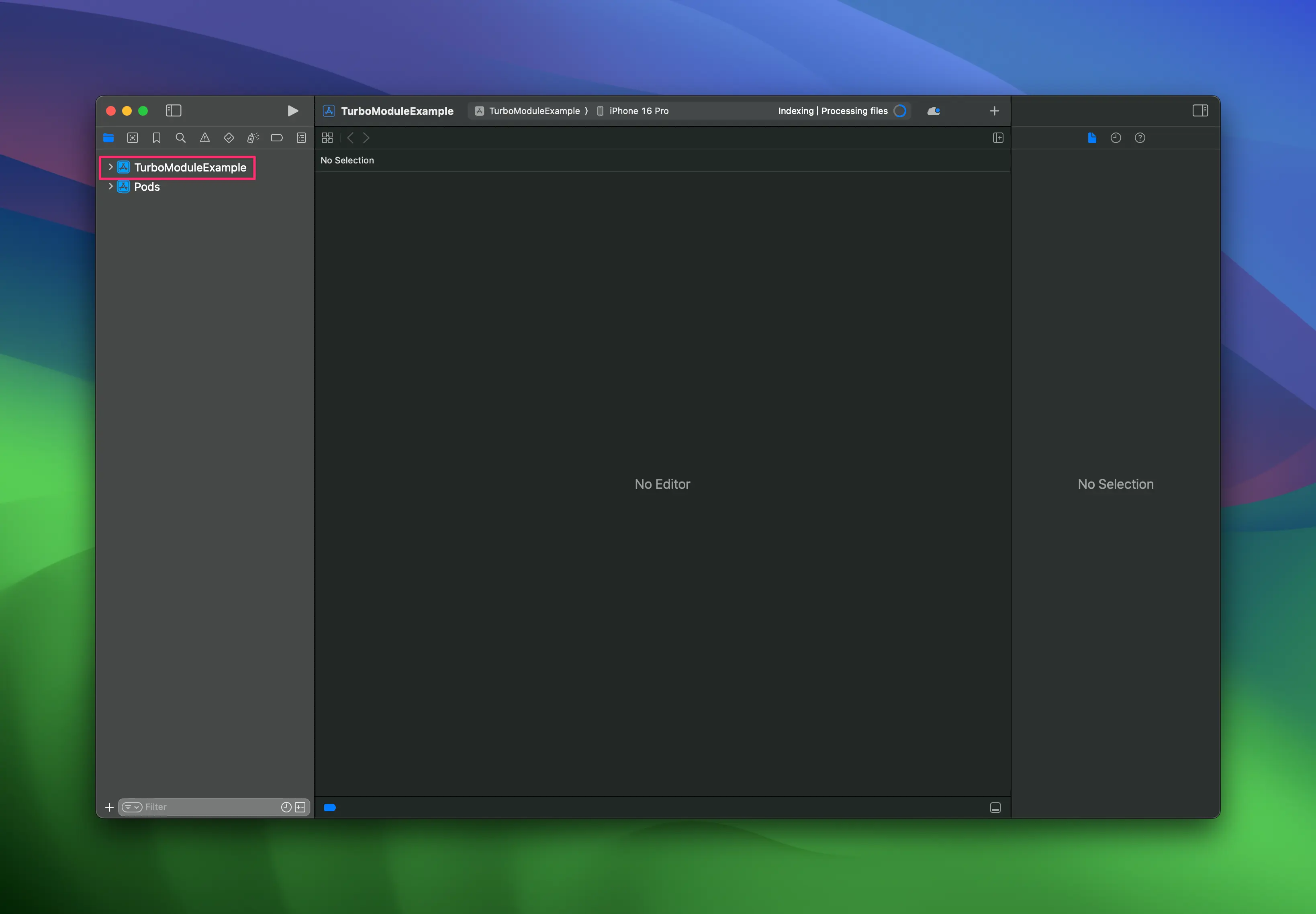
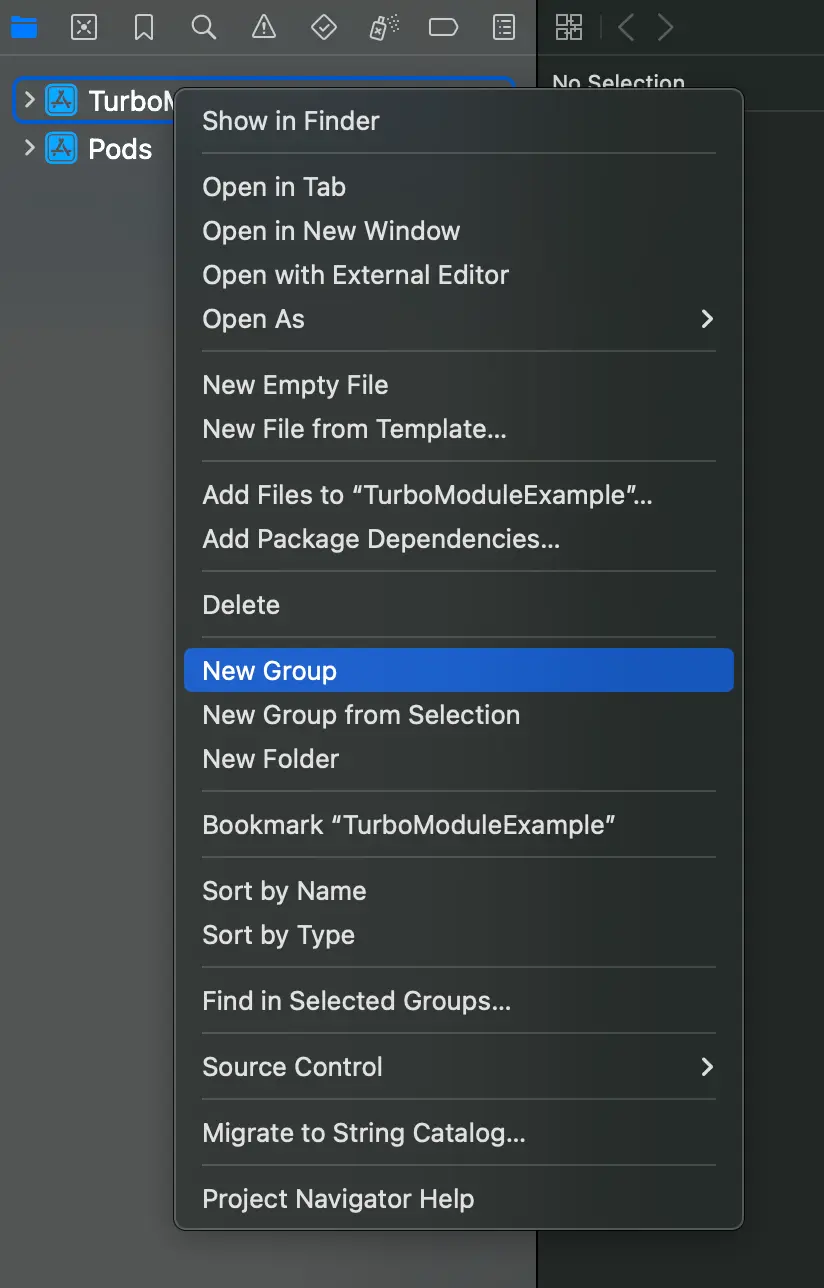
- 右键点击 app 并选择
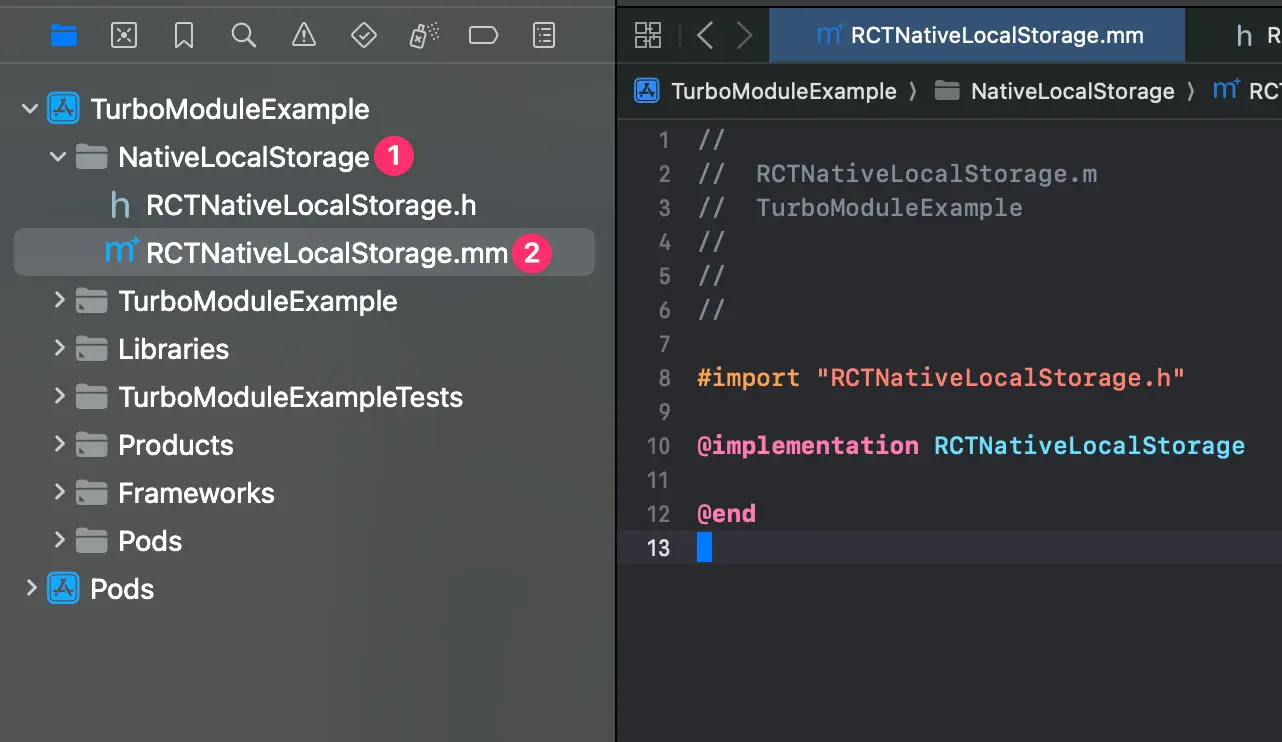
New Group,将新组命名为NativeLocalStorage。
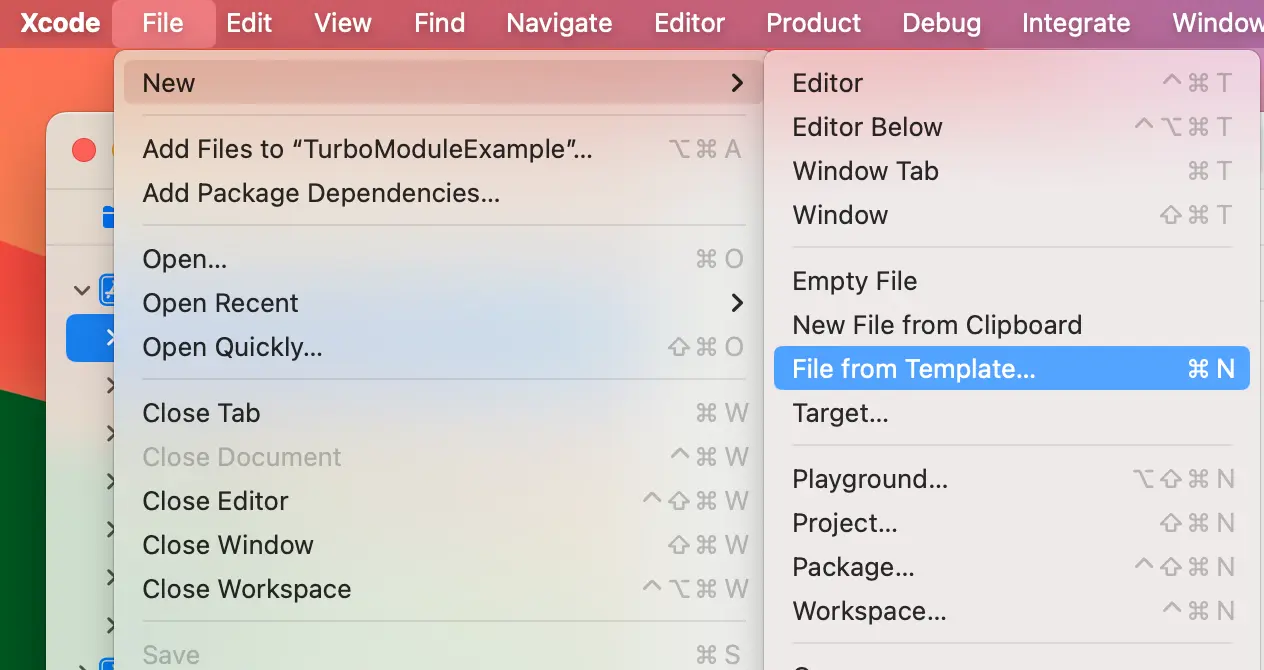
- 在
NativeLocalStorage组中,创建New→File from Template。
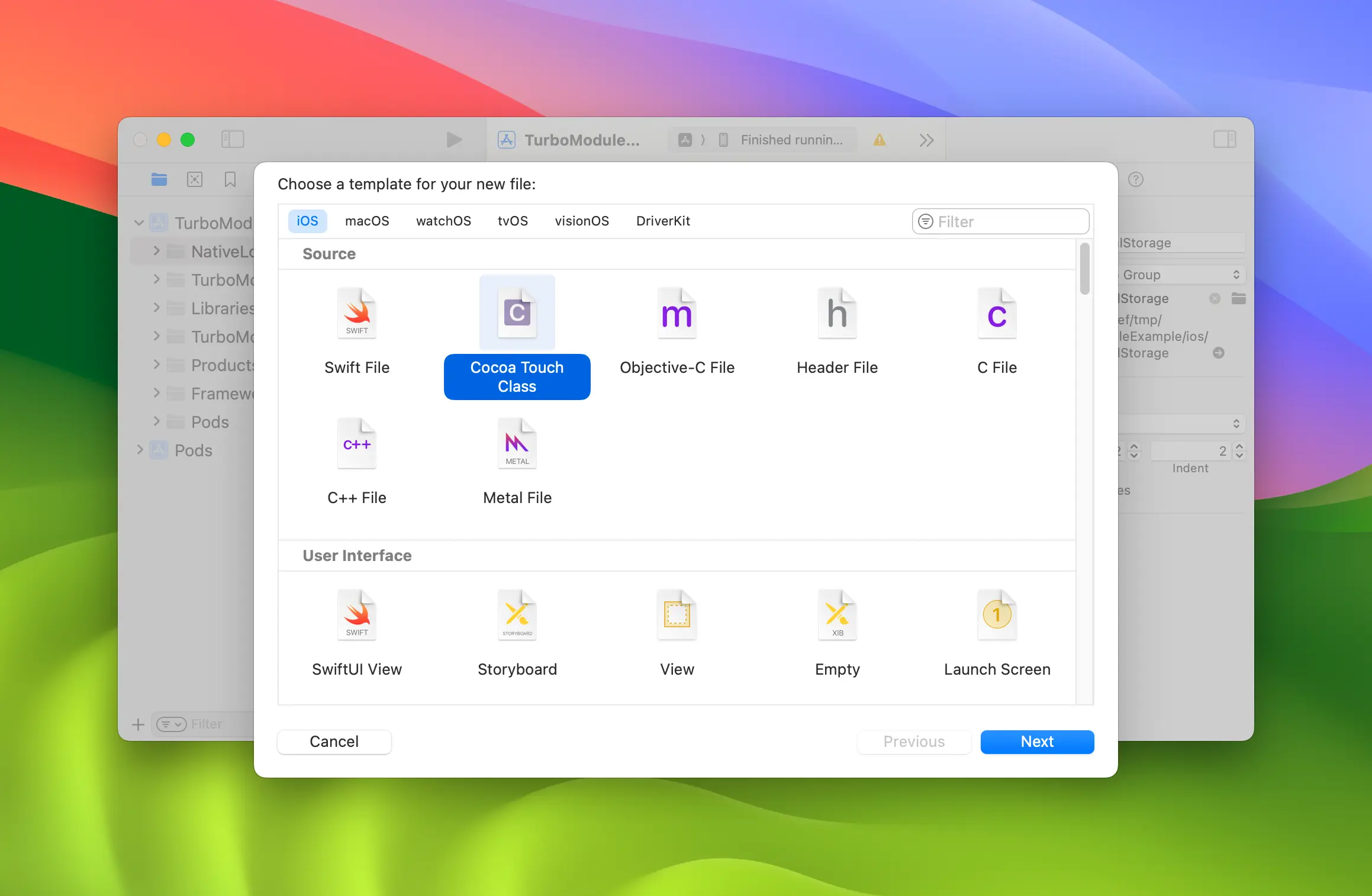
- 使用
Cocoa Touch Class。
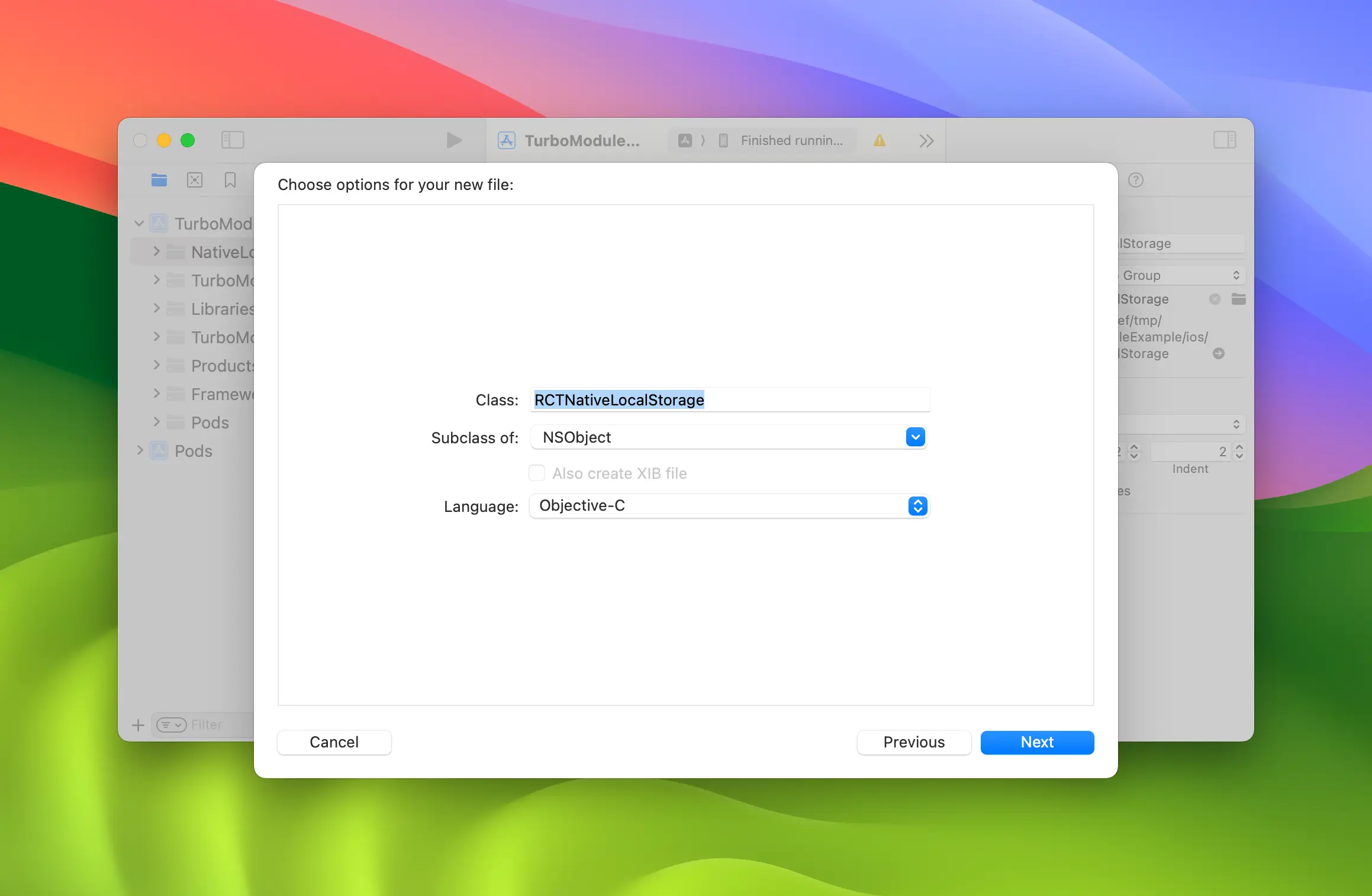
- 将 Cocoa Touch Class 命名为
RCTNativeLocalStorage,语言选择Objective-C。
- 重命名
RCTNativeLocalStorage.m→RCTNativeLocalStorage.mm,使其成为 Objective-C++ 文件。
使用 NSUserDefaults 实现 localStorage
首先更新 RCTNativeLocalStorage.h:
//  RCTNativeLocalStorage.h
//  TurboModuleExample

#import <Foundation/Foundation.h>
#import <NativeLocalStorageSpec/NativeLocalStorageSpec.h>

NS_ASSUME_NONNULL_BEGIN

@interface RCTNativeLocalStorage : NSObject
@interface RCTNativeLocalStorage : NSObject <NativeLocalStorageSpec>

@end
然后更新我们的实现以使用 NSUserDefaults 和自定义的 套件名称。
//  RCTNativeLocalStorage.m
//  TurboModuleExample

#import "RCTNativeLocalStorage.h"

static NSString *const RCTNativeLocalStorageKey = @"local-storage";

@interface RCTNativeLocalStorage()
@property (strong, nonatomic) NSUserDefaults *localStorage;
@end

@implementation RCTNativeLocalStorage

- (id) init {
  if (self = [super init]) {
    _localStorage = [[NSUserDefaults alloc] initWithSuiteName:RCTNativeLocalStorageKey];
  }
  return self;
}

- (std::shared_ptr<facebook::react::TurboModule>)getTurboModule:(const facebook::react::ObjCTurboModule::InitParams &)params {
  return std::make_shared<facebook::react::NativeLocalStorageSpecJSI>(params);
}

- (NSString * _Nullable)getItem:(NSString *)key {
  return [self.localStorage stringForKey:key];
}

- (void)setItem:(NSString *)value
          key:(NSString *)key {
  [self.localStorage setObject:value forKey:key];
}

- (void)removeItem:(NSString *)key {
  [self.localStorage removeObjectForKey:key];
}

- (void)clear {
  NSDictionary *keys = [self.localStorage dictionaryRepresentation];
  for (NSString *key in keys) {
    [self removeItem:key];
  }
}

+ (NSString *)moduleName
{
  return @"NativeLocalStorage";
}

@end
需要注意的重要事项:
- 你可以使用 Xcode 跳转到 Codegen
@protocol NativeLocalStorageSpec。你也可以使用 Xcode 为你生成存根。
在你的应用中注册原生模块
最后一步是更新 package.json,以告知 React Native 原生模块的 JS 规范与原生代码中这些规范的具体实现之间的链接。
按如下方式修改 package.json:
     "start": "react-native start",
     "test": "jest"
   },
   "codegenConfig": {
     "name": "NativeLocalStorageSpec",
     "type": "modules",
     "jsSrcsDir": "specs",
     "android": {
       "javaPackageName": "com.nativelocalstorage"
     },
     "ios": {
        "modulesProvider": {
          "NativeLocalStorage": "RCTNativeLocalStorage"
        }
     }
   },

   "dependencies": {
此时,你需要重新安装 pods 以确保 codegen 再次运行并生成新文件:
# from the ios folder
bundle exec pod install
open TurboModuleExample.xcworkspace
如果你现在从 Xcode 构建你的应用程序,你应该能够成功构建。
在模拟器上构建并运行你的代码
- npm
- Yarn
npm run ios
yarn run ios