原生组件
如果你想构建包裹 Host Component 的新 React Native Components,例如 Android 上的独特类型 CheckBox,或 iOS 上的 UIButton,你应该使用 Fabric Native Component。
本指南将通过实现一个 web view component,向你展示如何构建 Fabric Native Components。具体步骤如下:
- 使用 Flow 或 TypeScript 定义 JavaScript 规范。
- 配置依赖项管理系统,从提供的规范生成代码并实现自动链接。
- 实现 Native 代码。
- 在 App 中使用 Component。
你需要一个通过以下命令生成的普通模板应用来使用该组件:
npx @react-native-community/cli@latest init Demo --install-pods false
创建 WebView Component
本指南将向你展示如何创建 Web View component。我们将使用 Android 的 WebView component,以及 iOS 的 WKWebView component 来创建该组件。
首先创建用于存放 component 代码的文件夹结构:
mkdir -p Demo/{specs,android/app/src/main/java/com/webview}
这将生成以下布局,你将在其中进行工作:
Demo
├── android/app/src/main/java/com/webview
└── ios
└── specs
android/app/src/main/java/com/webview文件夹用于存放 Android 代码。ios文件夹用于存放 iOS 代码。specs文件夹用于存放 Codegen 的规范文件。
1. 为 Codegen 定义规范
你的规范必须使用 TypeScript 或 Flow 定义(有关更多详细信息,请参阅 Codegen 文档)。Codegen 使用此规范生成 C++、Objective-C++ 和 Java 代码,以将你的平台代码连接到 React 运行的 JavaScript runtime。
规范文件必须命名为 <MODULE_NAME>NativeComponent.{ts|js} 才能与 Codegen 配合使用。NativeComponent 后缀不仅是一种约定,Codegen 实际上会使用它来检测规范文件。
为我们的 WebView Component 使用以下规范:
- TypeScript
- Flow
import type {
  CodegenTypes,
  HostComponent,
  ViewProps,
} from 'react-native';
import {codegenNativeComponent} from 'react-native';

type WebViewScriptLoadedEvent = {
  result: 'success' | 'error';
};

export interface NativeProps extends ViewProps {
  sourceURL?: string;
  onScriptLoaded?: CodegenTypes.BubblingEventHandler<WebViewScriptLoadedEvent> | null;
}

export default codegenNativeComponent<NativeProps>(
  'CustomWebView',
) as HostComponent<NativeProps>;
// @flow strict-local

import type {CodegenTypes, HostComponent, ViewProps} from 'react-native';
import {codegenNativeComponent} from 'react-native';

type WebViewScriptLoadedEvent = $ReadOnly<{|
  result: "success" | "error",
|}>;

type NativeProps = $ReadOnly<{|
  ...ViewProps,
  sourceURL?: string;
  onScriptLoaded?: CodegenTypes.BubblingEventHandler<WebViewScriptLoadedEvent>?;
|}>;

export default (codegenNativeComponent<NativeProps>(
  'CustomWebView',
): HostComponent<NativeProps>);
该规范由三个主要部分组成,不包括导入:
WebViewScriptLoadedEvent是一种支持性数据类型,用于定义事件需要从 native 传递到 JavaScript 的数据。NativeProps定义了我们可以在 component 上设置的 props。codegenNativeComponent语句允许我们为 custom component 生成代码,并定义用于匹配 native implementations 的 component 名称。
与 Native Modules 一样,你可以在 specs/ 目录中拥有多个规范文件。有关可以使用的类型,以及这些类型映射到的平台类型的更多信息,请参阅附录。
2. 配置 Codegen 运行
React Native 的 Codegen 工具使用该规范为我们生成特定平台的接口和样板代码。为此,Codegen 需要知道在哪里找到我们的规范以及如何处理它。更新你的 package.json,加入以下内容:
    "start": "react-native start",
    "test": "jest"
  },
  "codegenConfig": {
    "name": "AppSpec",
    "type": "components",
    "jsSrcsDir": "specs",
    "android": {
      "javaPackageName": "com.webview"
    },
    "ios": {
      "componentProvider": {
        "CustomWebView": "RCTWebView"
      }
    }
  },
  "dependencies": {
Codegen 的所有配置完成后,我们需要准备 native code,以接入生成的代码。
请注意,对于 iOS,我们以声明方式将规范导出的 JS component 名称(CustomWebView)映射到将在 native 中实现该 component 的 iOS class。
2. 构建你的 Native Code
现在是时候编写 native platform code 了,这样当 React 需要渲染一个 view 时,平台就可以创建正确的 native view 并将其渲染到屏幕上。
你应该分别完成 Android 和 iOS 平台的实现。
本指南介绍了如何创建仅适用于 New Architecture 的 Native Component。如果你需要同时支持 New Architecture 和 Legacy Architecture,请参阅我们的向后兼容指南。
- Android
- iOS
现在是编写一些 Android 平台代码以便能够渲染 web view 的时候了。需要遵循的步骤如下:
- 运行 Codegen
- 编写
ReactWebView的代码 - 编写
ReactWebViewManager的代码 - 编写
ReactWebViewPackage的代码 - 在应用中注册
ReactWebViewPackage
1. 通过 Gradle 运行 Codegen
运行一次此命令,以生成 IDE 可以使用的样板代码。
cd android
./gradlew generateCodegenArtifactsFromSchema
Codegen 将生成你需要实现的 ViewManager 接口,以及 web view 的 ViewManager 委托。
2. 编写 ReactWebView
ReactWebView 是包装 Android 原生视图的组件,React Native 在使用自定义组件时将渲染该原生视图。
在 android/src/main/java/com/webview 文件夹中创建 ReactWebView.java 或 ReactWebView.kt 文件,并写入以下代码:
- Java
- Kotlin
package com.webview;

import android.content.Context;
import android.util.AttributeSet;
import android.webkit.WebView;
import android.webkit.WebViewClient;

import com.facebook.react.bridge.Arguments;
import com.facebook.react.bridge.WritableMap;
import com.facebook.react.bridge.ReactContext;
import com.facebook.react.uimanager.UIManagerHelper;
import com.facebook.react.uimanager.events.Event;

public class ReactWebView extends WebView {
  public ReactWebView(Context context) {
    super(context);
    configureComponent();
  }

  public ReactWebView(Context context, AttributeSet attrs) {
    super(context, attrs);
    configureComponent();
  }

  public ReactWebView(Context context, AttributeSet attrs, int defStyleAttr) {
    super(context, attrs, defStyleAttr);
    configureComponent();
  }

  private void configureComponent() {
    this.setLayoutParams(new LayoutParams(LayoutParams.MATCH_PARENT, LayoutParams.MATCH_PARENT));
    this.setWebViewClient(new WebViewClient() {
      @Override
      public void onPageFinished(WebView view, String url) {
        emitOnScriptLoaded(OnScriptLoadedEventResult.success);
      }
    });
  }

  public void emitOnScriptLoaded(OnScriptLoadedEventResult result) {
    ReactContext reactContext = (ReactContext) context;
    int surfaceId = UIManagerHelper.getSurfaceId(reactContext);
    EventDispatcher eventDispatcher = UIManagerHelper.getEventDispatcherForReactTag(reactContext, getId());
    WritableMap payload = Arguments.createMap();
    payload.putString("result", result.name());

    OnScriptLoadedEvent event = new OnScriptLoadedEvent(surfaceId, getId(), payload);
    if (eventDispatcher != null) {
      eventDispatcher.dispatchEvent(event);
    }
  }

  public enum OnScriptLoadedEventResult {
    success,
    error
  }

  private class OnScriptLoadedEvent extends Event<OnScriptLoadedEvent> {
    private final WritableMap payload;

    OnScriptLoadedEvent(int surfaceId, int viewId, WritableMap payload) {
      super(surfaceId, viewId);
      this.payload = payload;
    }

    @Override
    public String getEventName() {
      return "onScriptLoaded";
    }

    @Override
    public WritableMap getEventData() {
      return payload;
    }
  }
}
package com.webview

import android.content.Context
import android.util.AttributeSet
import android.webkit.WebView
import android.webkit.WebViewClient
import com.facebook.react.bridge.Arguments
import com.facebook.react.bridge.WritableMap
import com.facebook.react.bridge.ReactContext
import com.facebook.react.uimanager.UIManagerHelper
import com.facebook.react.uimanager.events.Event

class ReactWebView: WebView {
  constructor(context: Context) : super(context) {
    configureComponent()
  }

  constructor(context: Context, attrs: AttributeSet?) : super(context, attrs) {
    configureComponent()
  }

  constructor(context: Context, attrs: AttributeSet?, defStyleAttr: Int) : super(context, attrs, defStyleAttr) {
    configureComponent()
  }

  private fun configureComponent() {
    this.layoutParams = LayoutParams(LayoutParams.MATCH_PARENT, LayoutParams.MATCH_PARENT)
    this.webViewClient = object : WebViewClient() {
      override fun onPageFinished(view: WebView, url: String) {
        emitOnScriptLoaded(OnScriptLoadedEventResult.success)
      }
    }
  }

  fun emitOnScriptLoaded(result: OnScriptLoadedEventResult) {
    val reactContext = context as ReactContext
    val surfaceId = UIManagerHelper.getSurfaceId(reactContext)
    val eventDispatcher = UIManagerHelper.getEventDispatcherForReactTag(reactContext, id)
    val payload =
        Arguments.createMap().apply {
          putString("result", result.name)
        }
    val event = OnScriptLoadedEvent(surfaceId, id, payload)

    eventDispatcher?.dispatchEvent(event)
  }

  enum class OnScriptLoadedEventResult {
    success,
    error;
  }

  inner class OnScriptLoadedEvent(
      surfaceId: Int,
      viewId: Int,
      private val payload: WritableMap
  ) : Event<OnScriptLoadedEvent>(surfaceId, viewId) {
    override fun getEventName() = "onScriptLoaded"

    override fun getEventData() = payload
  }
}
ReactWebView 扩展了 Android WebView,因此你可以轻松复用平台已经定义的所有属性。
该类定义了三个 Android 构造函数,但将它们的实际实现交给私有的 configureComponent 函数。此函数负责初始化所有组件特有的属性:在本例中,你需要设置 WebView 的布局,并定义用于自定义 WebView 行为的 WebClient。在这段代码中,ReactWebView 通过实现 WebClient 的 onPageFinished 方法,在页面加载完成时发出一个事件。
接下来,代码定义了一个用于实际发出事件的辅助函数。要发出事件,你需要:
- 获取
ReactContext的引用; - 获取你正在呈现的视图的
surfaceId; - 获取与该视图关联的
eventDispatcher的引用; - 使用
WritableMap对象构建事件的载荷; - 创建需要发送给 JavaScript 的事件对象;
- 调用
eventDispatcher.dispatchEvent发送事件。
文件的最后部分包含了发送事件所需数据类型的定义:
OnScriptLoadedEventResult,包含OnScriptLoaded事件可能的结果。- 实际的
OnScriptLoadedEvent,它需要扩展 React Native 的Event类。
3. 编写 WebViewManager
WebViewManager 是连接 React Native 运行时与原生视图的类。
当 React 从应用接收到渲染特定组件的指令时,React 会使用已注册的视图管理器来创建视图,并传递所有必需的属性。
以下是 ReactWebViewManager 的代码。
- Java
- Kotlin
package com.webview;

import com.facebook.react.bridge.ReactApplicationContext;
import com.facebook.react.module.annotations.ReactModule;
import com.facebook.react.uimanager.SimpleViewManager;
import com.facebook.react.uimanager.ThemedReactContext;
import com.facebook.react.uimanager.ViewManagerDelegate;
import com.facebook.react.uimanager.annotations.ReactProp;
import com.facebook.react.viewmanagers.CustomWebViewManagerInterface;
import com.facebook.react.viewmanagers.CustomWebViewManagerDelegate;

import java.util.HashMap;
import java.util.Map;

@ReactModule(name = ReactWebViewManager.REACT_CLASS)
class ReactWebViewManager extends SimpleViewManager<ReactWebView> implements CustomWebViewManagerInterface<ReactWebView> {
  private final CustomWebViewManagerDelegate<ReactWebView, ReactWebViewManager> delegate =
          new CustomWebViewManagerDelegate<>(this);

  @Override
  public ViewManagerDelegate<ReactWebView> getDelegate() {
    return delegate;
  }

  @Override
  public String getName() {
    return REACT_CLASS;
  }

  @Override
  public ReactWebView createViewInstance(ThemedReactContext context) {
    return new ReactWebView(context);
  }

  @ReactProp(name = "sourceUrl")
  @Override
  public void setSourceURL(ReactWebView view, String sourceURL) {
    if (sourceURL == null) {
      view.emitOnScriptLoaded(ReactWebView.OnScriptLoadedEventResult.error);
      return;
    }
    view.loadUrl(sourceURL, new HashMap<>());
  }

  public static final String REACT_CLASS = "CustomWebView";

  @Override
  public Map<String, Object> getExportedCustomBubblingEventTypeConstants() {
    Map<String, Object> map = new HashMap<>();
    Map<String, Object> bubblingMap = new HashMap<>();
    bubblingMap.put("phasedRegistrationNames", new HashMap<String, String>() {{
      put("bubbled", "onScriptLoaded");
      put("captured", "onScriptLoadedCapture");
    }});
    map.put("onScriptLoaded", bubblingMap);
    return map;
  }
}
package com.webview

import com.facebook.react.bridge.ReactApplicationContext;
import com.facebook.react.module.annotations.ReactModule;
import com.facebook.react.uimanager.SimpleViewManager;
import com.facebook.react.uimanager.ThemedReactContext;
import com.facebook.react.uimanager.ViewManagerDelegate;
import com.facebook.react.uimanager.annotations.ReactProp;
import com.facebook.react.viewmanagers.CustomWebViewManagerInterface;
import com.facebook.react.viewmanagers.CustomWebViewManagerDelegate;

@ReactModule(name = ReactWebViewManager.REACT_CLASS)
class ReactWebViewManager(context: ReactApplicationContext) : SimpleViewManager<ReactWebView>(), CustomWebViewManagerInterface<ReactWebView> {
  private val delegate: CustomWebViewManagerDelegate<ReactWebView, ReactWebViewManager> =
    CustomWebViewManagerDelegate(this)

  override fun getDelegate(): ViewManagerDelegate<ReactWebView> = delegate

  override fun getName(): String = REACT_CLASS

  override fun createViewInstance(context: ThemedReactContext): ReactWebView = ReactWebView(context)

  @ReactProp(name = "sourceUrl")
  override fun setSourceURL(view: ReactWebView, sourceURL: String?) {
    if (sourceURL == null) {
      view.emitOnScriptLoaded(ReactWebView.OnScriptLoadedEventResult.error)
      return;
    }
    view.loadUrl(sourceURL, emptyMap())
  }

  companion object {
    const val REACT_CLASS = "CustomWebView"
  }

  override fun getExportedCustomBubblingEventTypeConstants(): Map<String, Any> =
      mapOf(
          "onScriptLoaded" to
              mapOf(
                  "phasedRegistrationNames" to
                      mapOf(
                          "bubbled" to "onScriptLoaded",
                          "captured" to "onScriptLoadedCapture"
                      )))
}
ReactWebViewManager 扩展了 React 的 SimpleViewManager 类,并实现了由 Codegen 生成的 CustomWebViewManagerInterface。
它持有由 Codegen 生成的另一个元素 CustomWebViewManagerDelegate 的引用。
然后,它重写 getName 函数,该函数必须返回与规范中 codegenNativeComponent 函数调用所使用的名称相同的名称。
createViewInstance 函数负责实例化新的 ReactWebView。
接下来,ViewManager 需要定义 React 的所有组件属性如何更新原生视图。在本例中,你需要决定如何处理 React 将设置到 WebView 上的 sourceURL 属性。
最后,如果组件可以发出事件,则需要通过重写用于冒泡事件的 getExportedCustomBubblingEventTypeConstants,或用于直接事件的 getExportedCustomDirectEventTypeConstants,来映射事件名称。
4. 编写 ReactWebViewPackage
与 Native Modules 一样,Native Components 也需要实现 ReactPackage 类。这是一个可用于在 React Native 运行时中注册组件的对象。
以下是 ReactWebViewPackage 的代码:
- Java
- Kotlin
package com.webview;

import com.facebook.react.BaseReactPackage;
import com.facebook.react.bridge.NativeModule;
import com.facebook.react.bridge.ReactApplicationContext;
import com.facebook.react.module.model.ReactModuleInfo;
import com.facebook.react.module.model.ReactModuleInfoProvider;
import com.facebook.react.uimanager.ViewManager;

import java.util.Collections;
import java.util.HashMap;
import java.util.List;
import java.util.Map;

public class ReactWebViewPackage extends BaseReactPackage {
  @Override
  public List<ViewManager<?, ?>> createViewManagers(ReactApplicationContext reactContext) {
    return Collections.singletonList(new ReactWebViewManager(reactContext));
  }

  @Override
  public NativeModule getModule(String s, ReactApplicationContext reactApplicationContext) {
    if (ReactWebViewManager.REACT_CLASS.equals(s)) {
      return new ReactWebViewManager(reactApplicationContext);
    }
    return null;
  }

  @Override
  public ReactModuleInfoProvider getReactModuleInfoProvider() {
    return new ReactModuleInfoProvider() {
      @Override
      public Map<String, ReactModuleInfo> getReactModuleInfos() {
        Map<String, ReactModuleInfo> map = new HashMap<>();
        map.put(ReactWebViewManager.REACT_CLASS, new ReactModuleInfo(
                ReactWebViewManager.REACT_CLASS, // name
                ReactWebViewManager.REACT_CLASS, // className
                false,                           // canOverrideExistingModule
                false,                           // needsEagerInit
                false,                           // isCxxModule
                true                             // isTurboModule
        ));
        return map;
      }
    };
  }
}
package com.webview

import com.facebook.react.BaseReactPackage
import com.facebook.react.bridge.NativeModule
import com.facebook.react.bridge.ReactApplicationContext
import com.facebook.react.module.model.ReactModuleInfo
import com.facebook.react.module.model.ReactModuleInfoProvider
import com.facebook.react.uimanager.ViewManager

class ReactWebViewPackage : BaseReactPackage() {
  override fun createViewManagers(reactContext: ReactApplicationContext): List<ViewManager<*, *>> {
    return listOf(ReactWebViewManager(reactContext))
  }

  override fun getModule(s: String, reactApplicationContext: ReactApplicationContext): NativeModule? {
    when (s) {
      ReactWebViewManager.REACT_CLASS -> ReactWebViewManager(reactApplicationContext)
    }
    return null
  }

  override fun getReactModuleInfoProvider(): ReactModuleInfoProvider = ReactModuleInfoProvider {
    mapOf(ReactWebViewManager.REACT_CLASS to ReactModuleInfo(
      name = ReactWebViewManager.REACT_CLASS,
      className = ReactWebViewManager.REACT_CLASS,
      canOverrideExistingModule = false,
      needsEagerInit = false,
      isCxxModule = false,
      isTurboModule = true,
    )
    )
  }
}
ReactWebViewPackage 扩展了 BaseReactPackage,并实现了正确注册组件所需的全部方法。
createViewManagers方法是创建管理自定义视图的ViewManager的工厂方法。getModule方法根据 React Native 需要渲染的视图返回相应的 ViewManager。getReactModuleInfoProvider提供在运行时注册模块时所需的全部信息,
5. 在应用中注册 ReactWebViewPackage
最后,需要在应用中注册 ReactWebViewPackage。我们通过修改 MainApplication 文件,将 ReactWebViewPackage 添加到 getPackages 函数返回的软件包列表中来完成此操作。
package com.demo

import android.app.Application
import com.facebook.react.PackageList
import com.facebook.react.ReactApplication
import com.facebook.react.ReactHost
import com.facebook.react.ReactNativeHost
import com.facebook.react.ReactPackage
import com.facebook.react.defaults.DefaultNewArchitectureEntryPoint.load
import com.facebook.react.defaults.DefaultReactHost.getDefaultReactHost
import com.facebook.react.defaults.DefaultReactNativeHost
import com.facebook.react.soloader.OpenSourceMergedSoMapping
import com.facebook.soloader.SoLoader
import com.webview.ReactWebViewPackage

class MainApplication : Application(), ReactApplication {

  override val reactNativeHost: ReactNativeHost =
      object : DefaultReactNativeHost(this) {
        override fun getPackages(): List<ReactPackage> =
            PackageList(this).packages.apply {
              add(ReactWebViewPackage())
            }

        override fun getJSMainModuleName(): String = "index"

        override fun getUseDeveloperSupport(): Boolean = BuildConfig.DEBUG

        override val isNewArchEnabled: Boolean = BuildConfig.IS_NEW_ARCHITECTURE_ENABLED
        override val isHermesEnabled: Boolean = BuildConfig.IS_HERMES_ENABLED
      }

  override val reactHost: ReactHost
    get() = getDefaultReactHost(applicationContext, reactNativeHost)

  override fun onCreate() {
    super.onCreate()
    SoLoader.init(this, OpenSourceMergedSoMapping)
    if (BuildConfig.IS_NEW_ARCHITECTURE_ENABLED) {
      load()
    }
  }
}
现在是时候编写一些 iOS 平台代码,以便能够渲染网页视图了。你需要遵循以下步骤:
- 运行 Codegen
- 为
RCTWebView编写代码 - 在应用中注册
RCTWebView
1. 运行 Codegen
你可以手动运行 Codegen,不过更简单的方法是使用你要演示该组件的应用来为你完成此操作。
cd ios
bundle install
bundle exec pod install
请务必注意,你将看到 Codegen 的日志输出,我们将在 Xcode 中使用这些输出构建 WebView 原生组件。
你应该谨慎决定是否将生成的代码提交到代码仓库。生成的代码特定于每个 React Native 版本。使用 npm peerDependencies 来限制与 React Native 版本的兼容性。
3. 编写 RCTWebView
我们需要通过完成以下 5 个步骤,使用 Xcode 准备你的 iOS 项目:
- 打开 CocoaPods 生成的 Xcode Workspace:
cd ios
open Demo.xcworkspace
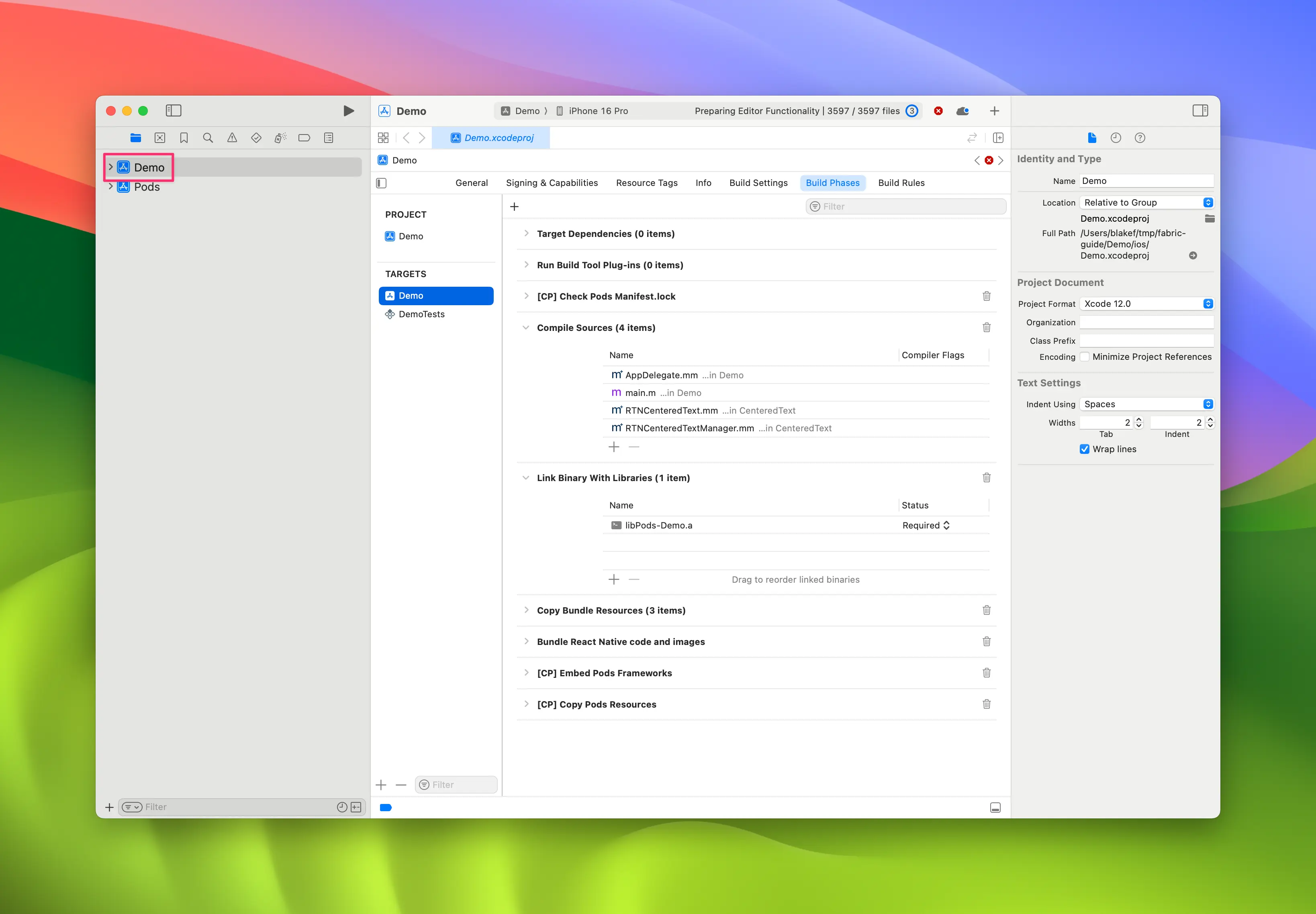
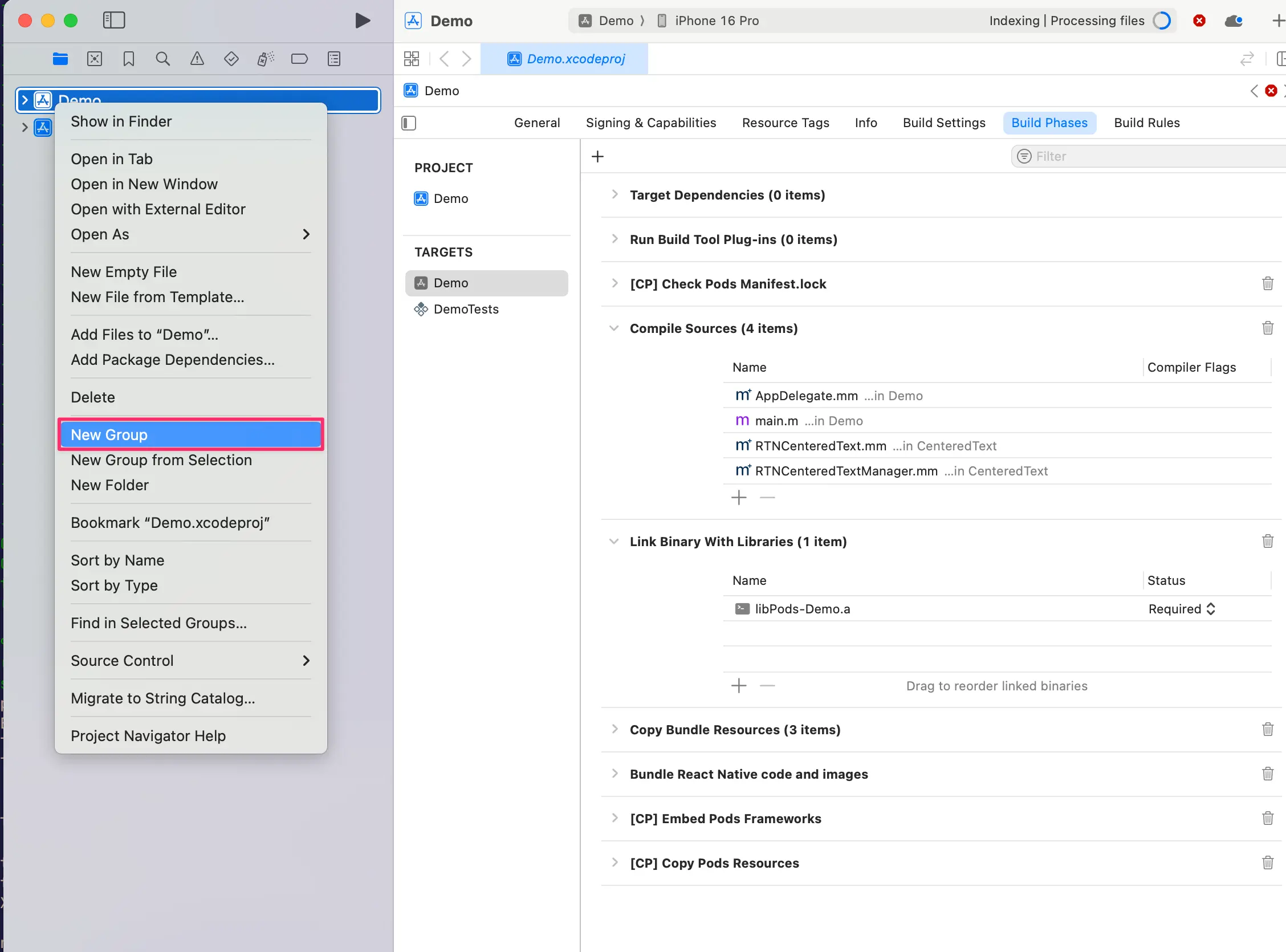
- 右键点击 app,然后选择
New Group,将新分组命名为WebView。
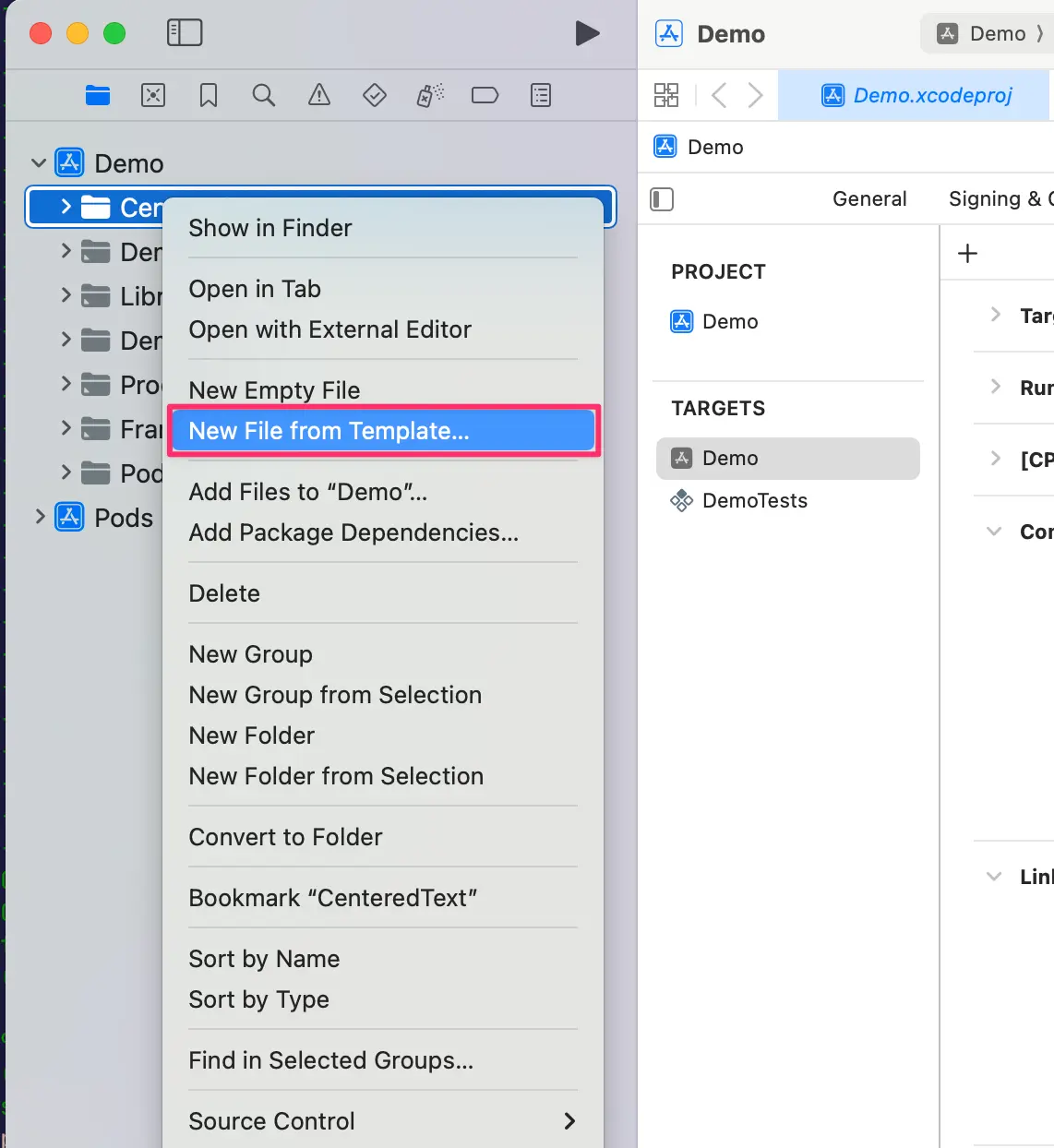
- 在
WebView分组中,创建New→File from Template。
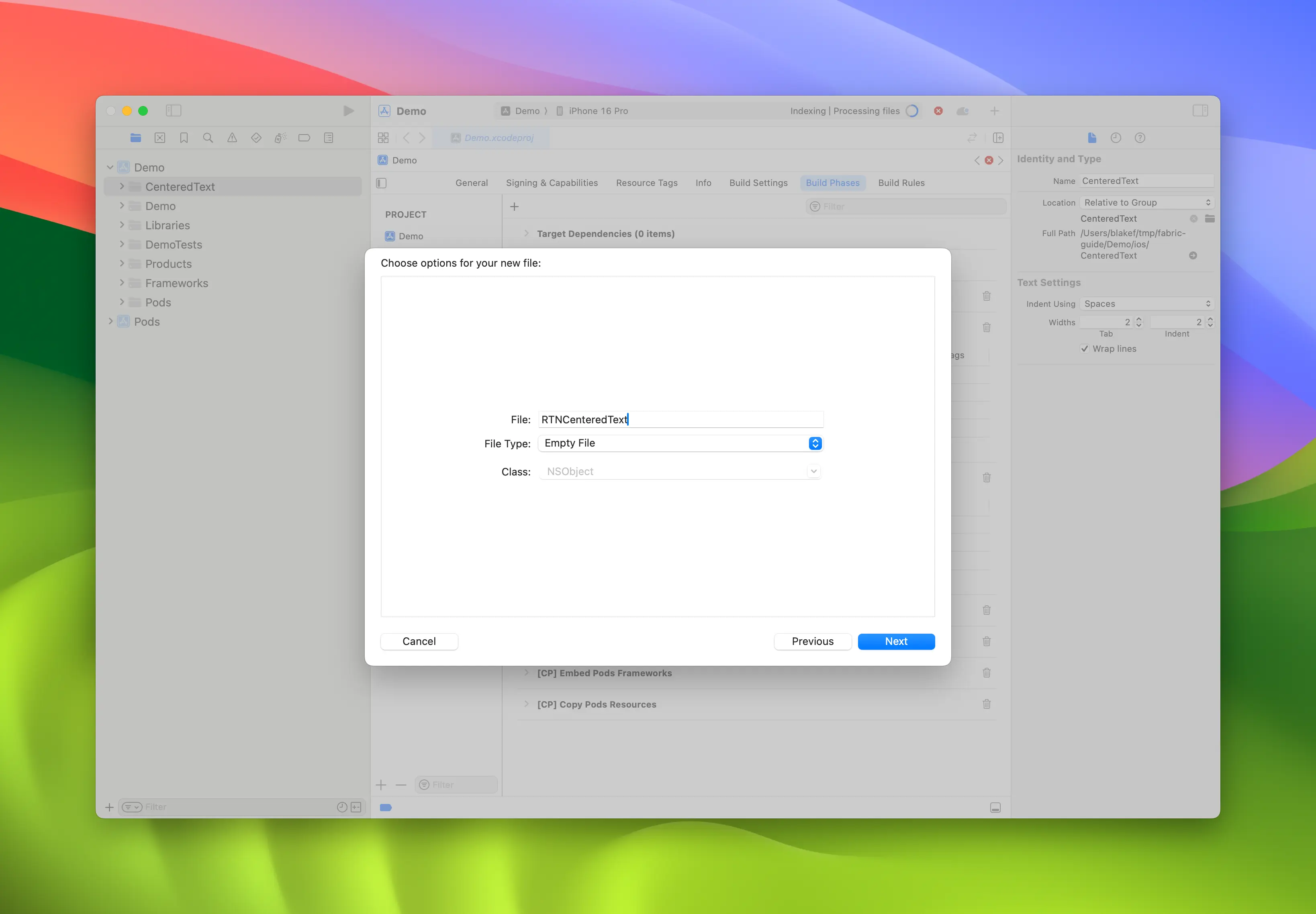
- 使用
Objective-C File模板,并将其命名为RCTWebView。
-
重复步骤 4,创建名为
RCTWebView.h的头文件。 -
将
RCTWebView.m重命名为RCTWebView.mm,使其成为 Objective-C++ 文件。
Podfile
...
Demo
├── AppDelegate.swift
...
├── RCTWebView.h
└── RCTWebView.mm
创建头文件和实现文件后,就可以开始实现它们了。
以下是 RCTWebView.h 文件的代码,该文件声明了组件接口。
#import <React/RCTViewComponentView.h>
#import <UIKit/UIKit.h>

NS_ASSUME_NONNULL_BEGIN

@interface RCTWebView : RCTViewComponentView

// You would declare native methods you'd want to access from the view here

@end

NS_ASSUME_NONNULL_END
此类定义了一个 RCTWebView,它扩展了 RCTViewComponentView 类。这是所有原生组件的基类,由 React Native 提供。
实现文件(RCTWebView.mm)的代码如下:
#import "RCTWebView.h"

#import <react/renderer/components/AppSpec/ComponentDescriptors.h>
#import <react/renderer/components/AppSpec/EventEmitters.h>
#import <react/renderer/components/AppSpec/Props.h>
#import <react/renderer/components/AppSpec/RCTComponentViewHelpers.h>
#import <WebKit/WebKit.h>

using namespace facebook::react;

@interface RCTWebView () <RCTCustomWebViewViewProtocol, WKNavigationDelegate>
@end

@implementation RCTWebView {
  NSURL * _sourceURL;
  WKWebView * _webView;
}

-(instancetype)init
{
  if(self = [super init]) {
    _webView = [WKWebView new];
    _webView.navigationDelegate = self;
    [self addSubview:_webView];
  }
  return self;
}

- (void)updateProps:(Props::Shared const &)props oldProps:(Props::Shared const &)oldProps
{
  const auto &oldViewProps = *std::static_pointer_cast<CustomWebViewProps const>(_props);
  const auto &newViewProps = *std::static_pointer_cast<CustomWebViewProps const>(props);

  // Handle your props here
  if (oldViewProps.sourceURL != newViewProps.sourceURL) {
    NSString *urlString = [NSString stringWithCString:newViewProps.sourceURL.c_str() encoding:NSUTF8StringEncoding];
    _sourceURL = [NSURL URLWithString:urlString];
    if ([self urlIsValid:newViewProps.sourceURL]) {
      [_webView loadRequest:[NSURLRequest requestWithURL:_sourceURL]];
    }
  }

  [super updateProps:props oldProps:oldProps];
}

-(void)layoutSubviews
{
  [super layoutSubviews];
  _webView.frame = self.bounds;

}

#pragma mark - WKNavigationDelegate

-(void)webView:(WKWebView *)webView didFinishNavigation:(WKNavigation *)navigation
{
  CustomWebViewEventEmitter::OnScriptLoaded result = CustomWebViewEventEmitter::OnScriptLoaded{CustomWebViewEventEmitter::OnScriptLoadedResult::Success};
  self.eventEmitter.onScriptLoaded(result);
}

- (BOOL)urlIsValid:(std::string)propString
{
  if (propString.length() > 0 && !_sourceURL) {
    CustomWebViewEventEmitter::OnScriptLoaded result = CustomWebViewEventEmitter::OnScriptLoaded{CustomWebViewEventEmitter::OnScriptLoadedResult::Error};

    self.eventEmitter.onScriptLoaded(result);
    return NO;
  }
  return YES;
}

// Event emitter convenience method
- (const CustomWebViewEventEmitter &)eventEmitter
{
  return static_cast<const CustomWebViewEventEmitter &>(*_eventEmitter);
}

+ (ComponentDescriptorProvider)componentDescriptorProvider
{
  return concreteComponentDescriptorProvider<CustomWebViewComponentDescriptor>();
}

@end
此代码使用 Objective-C++ 编写,其中包含以下各种细节:
@interface实现了两个协议:- 由 Codegen 生成的
RCTCustomWebViewViewProtocol - 由 WebKit 框架提供、用于处理网页视图导航事件的
WKNavigationDelegate
- 由 Codegen 生成的
init方法实例化WKWebView,将其添加到子视图中,并设置navigationDelegate- React Native 在组件的 props 发生变化时调用的
updateProps方法 - 描述自定义视图应如何布局的
layoutSubviews方法 webView:didFinishNavigation:方法,用于处理WKWebView完成页面加载后的操作urlIsValid:(std::string)propString方法,用于检查作为 prop 接收的 URL 是否有效eventEmitter方法,这是一个用于获取强类型eventEmitter实例的实用方法componentDescriptorProvider,用于返回由 Codegen 生成的ComponentDescriptor
添加 WebKit 框架
此步骤仅因为我们正在创建 Web 视图而需要。iOS 上的 Web 组件需要链接到 Apple 提供的 WebKit 框架。如果你的组件不需要访问 Web 专属功能,则可以跳过此步骤。
Web 视图需要访问一些由 Apple 通过随 Xcode 和设备附带的框架之一提供的功能:WebKit。
你可以在 RCTWebView.mm 中添加的 #import <WebKit/WebKit.h> 行看到它。
要在应用中链接 WebKit 框架,请按照以下步骤操作:
- 在 Xcode 中,点击你的项目
- 选择 app target
- 选择 General 标签页
- 向下滚动,直到找到 "Frameworks, Libraries, and Embedded Contents" 部分,然后点击
+按钮
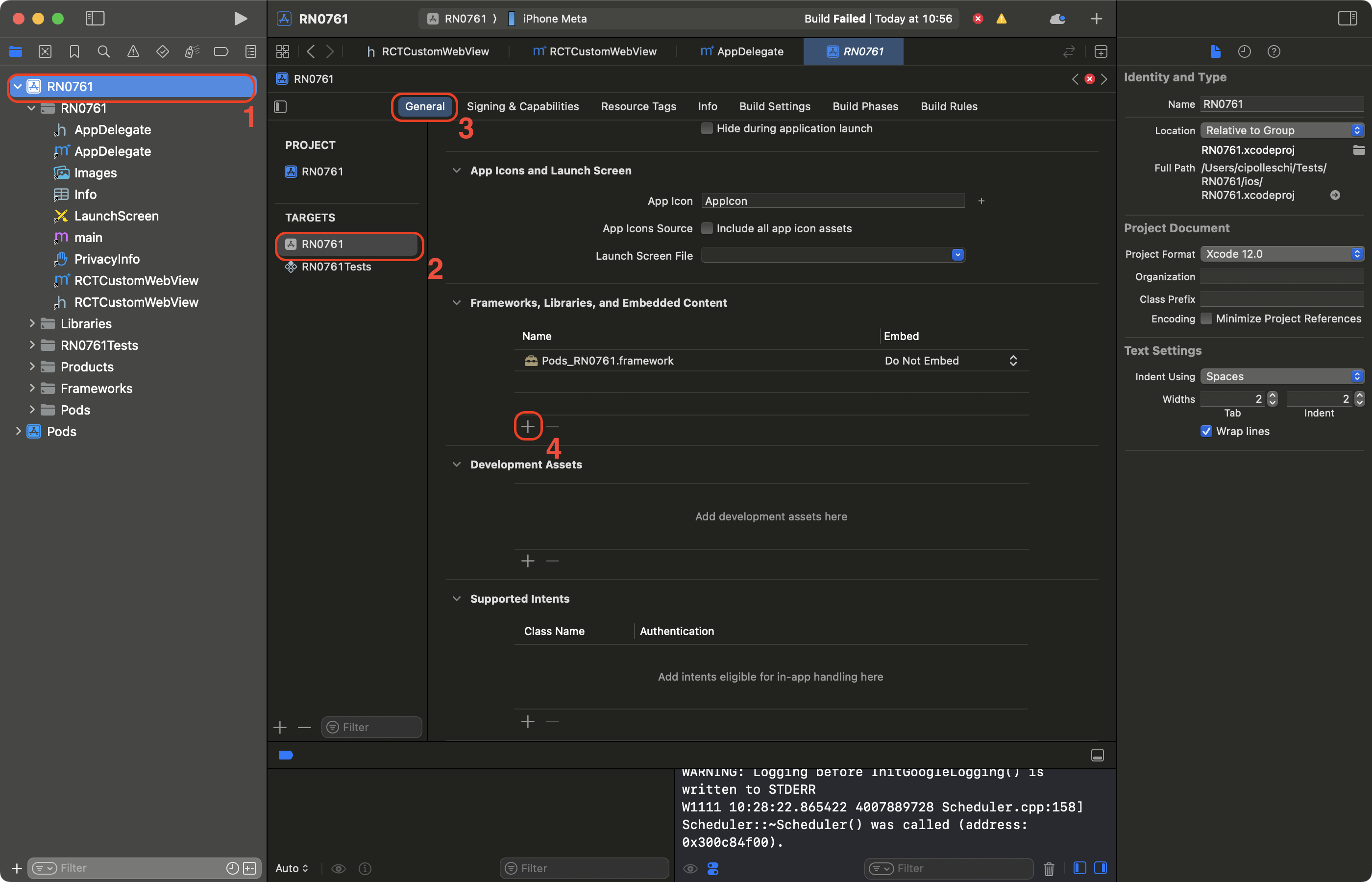
- 在搜索栏中筛选 WebKit
- 选择 WebKit 框架
- 点击 Add
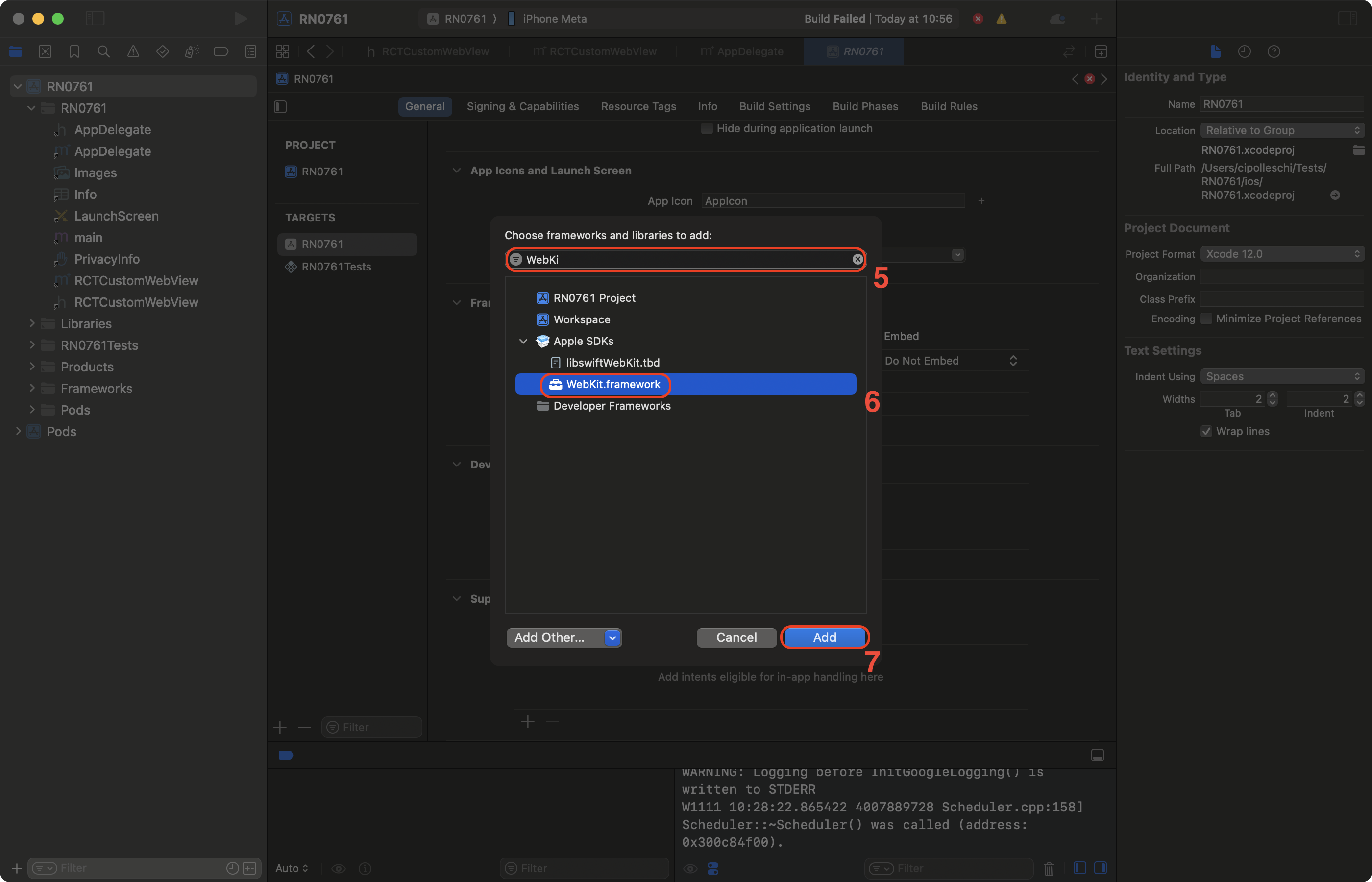
3. 使用你的 Native Component
最后,你可以在 app 中使用新的 component。将生成的 App.tsx 更新为:
import {Alert, StyleSheet, View} from 'react-native';
import WebView from './specs/WebViewNativeComponent';

function App(): React.JSX.Element {
  return (
    <View style={styles.container}>
      <WebView
        sourceURL="https://react.dev/"
        style={styles.webview}
        onScriptLoaded={() => {
          Alert.alert('Page Loaded');
        }}
      />
    </View>
  );
}

const styles = StyleSheet.create({
  container: {
    flex: 1,
    alignItems: 'center',
    alignContent: 'center',
  },
  webview: {
    width: '100%',
    height: '100%',
  },
});

export default App;
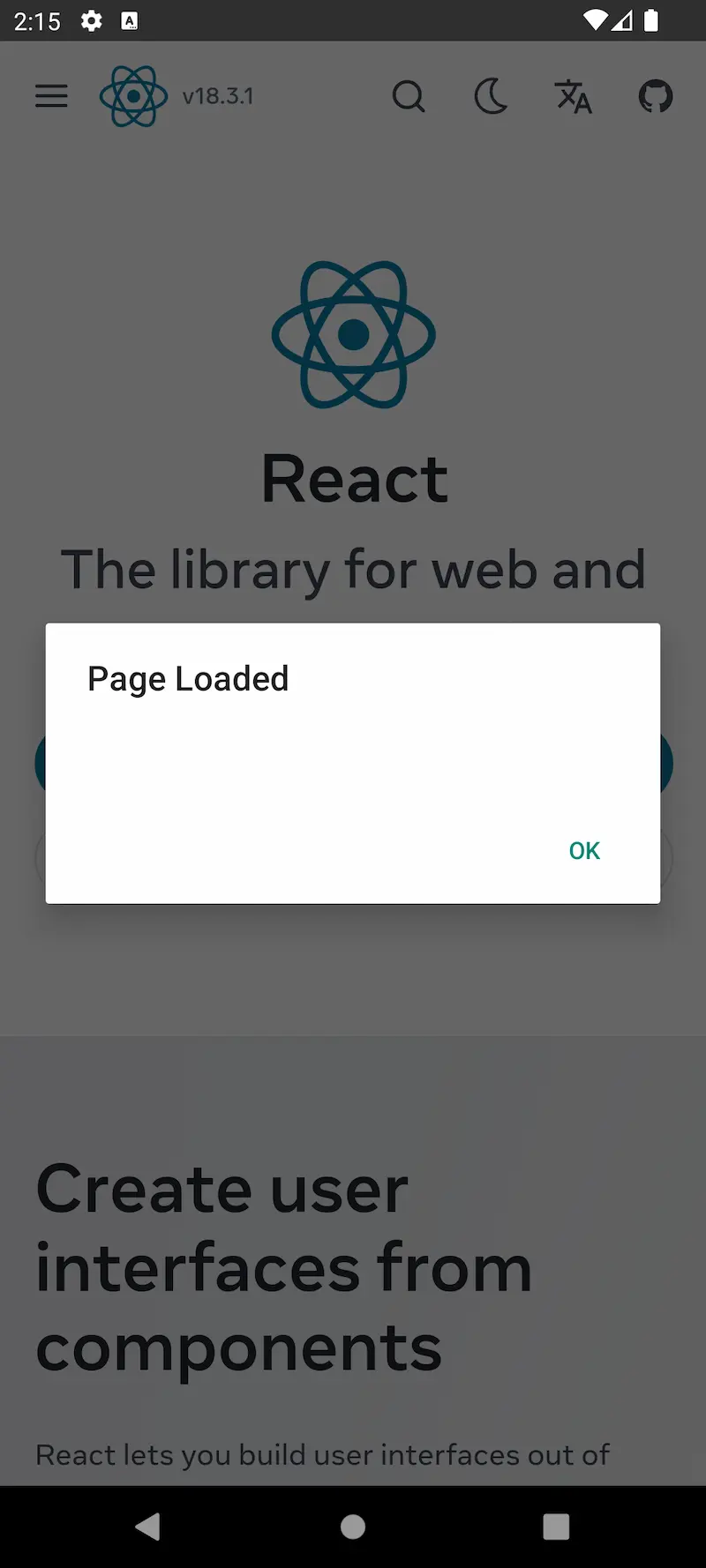
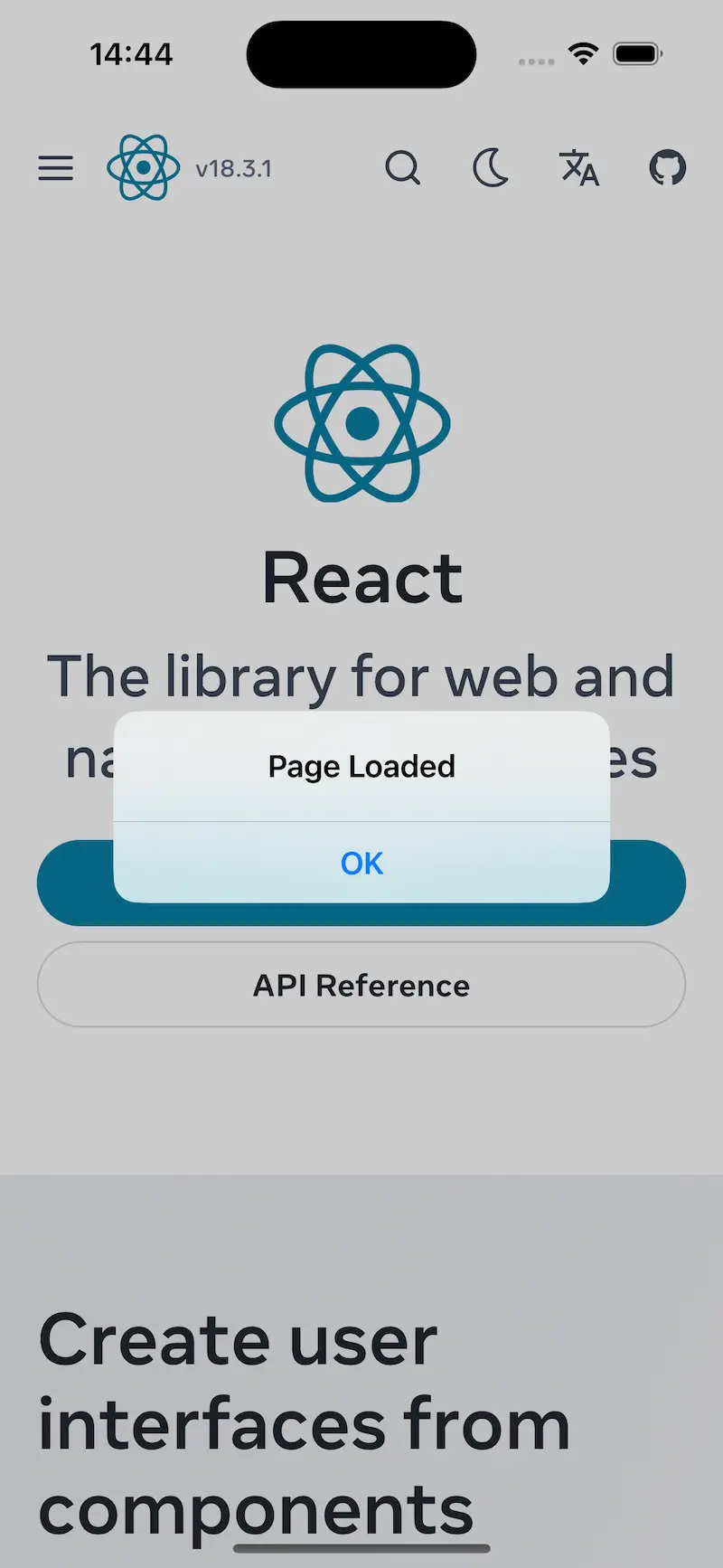
此代码创建了一个使用我们创建的新 WebView component 来加载 react.dev 网站的 app。
该 app 还会在网页加载完成时显示一个 alert。
4. 使用 WebView Component 运行你的 App
- Android
- iOS
yarn run android
yarn run ios
| Android | iOS |
|---|---|
 |  |