Fabric 原生组件:iOS
现在是时候编写一些 iOS 平台代码以便能够渲染 web 视图了。你需要遵循的步骤如下:
- 运行 Codegen。
- 编写
RCTWebView的代码 - 在应用程序中注册
RCTWebView
1. Run Codegen
你可以 手动运行 Codegen,然而更简单的方法是使用你将要用来演示组件的应用程序来为你完成此操作。
cd ios
bundle install
bundle exec pod install
重要的是,你将看到来自 Codegen 的日志输出,我们将在 Xcode 中使用它来构建我们的 WebView 原生组件。
你应该小心地将生成的代码提交到你的仓库。生成的代码特定于每个版本的 React Native。使用 npm peerDependencies 来限制与 React Native 版本的兼容性。
3. Write the RCTWebView
我们需要通过完成以下 5 个步骤 来使用 Xcode 准备你的 iOS 项目:
- 打开 CocoaPods 生成的 Xcode Workspace:
cd ios
open Demo.xcworkspace
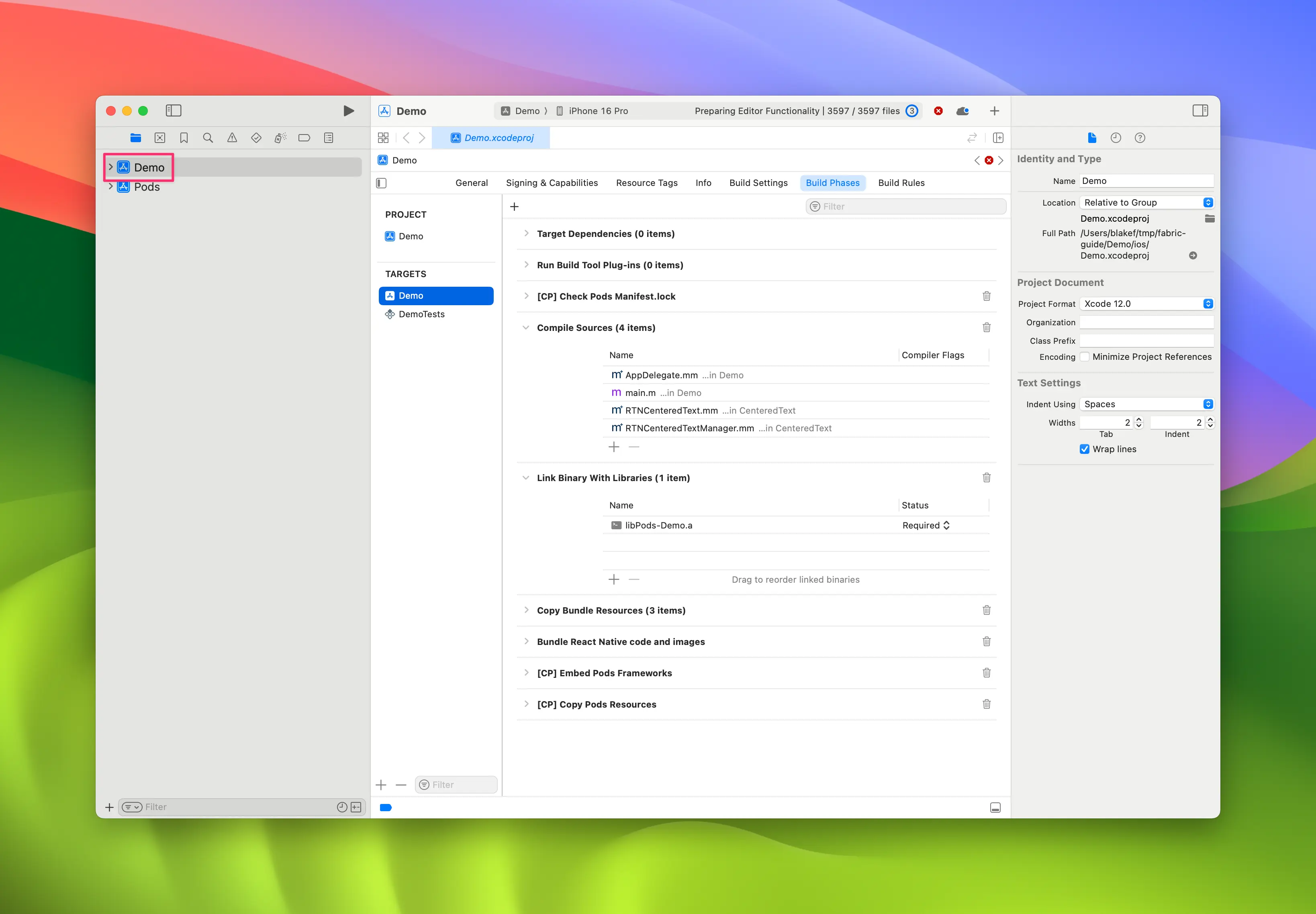
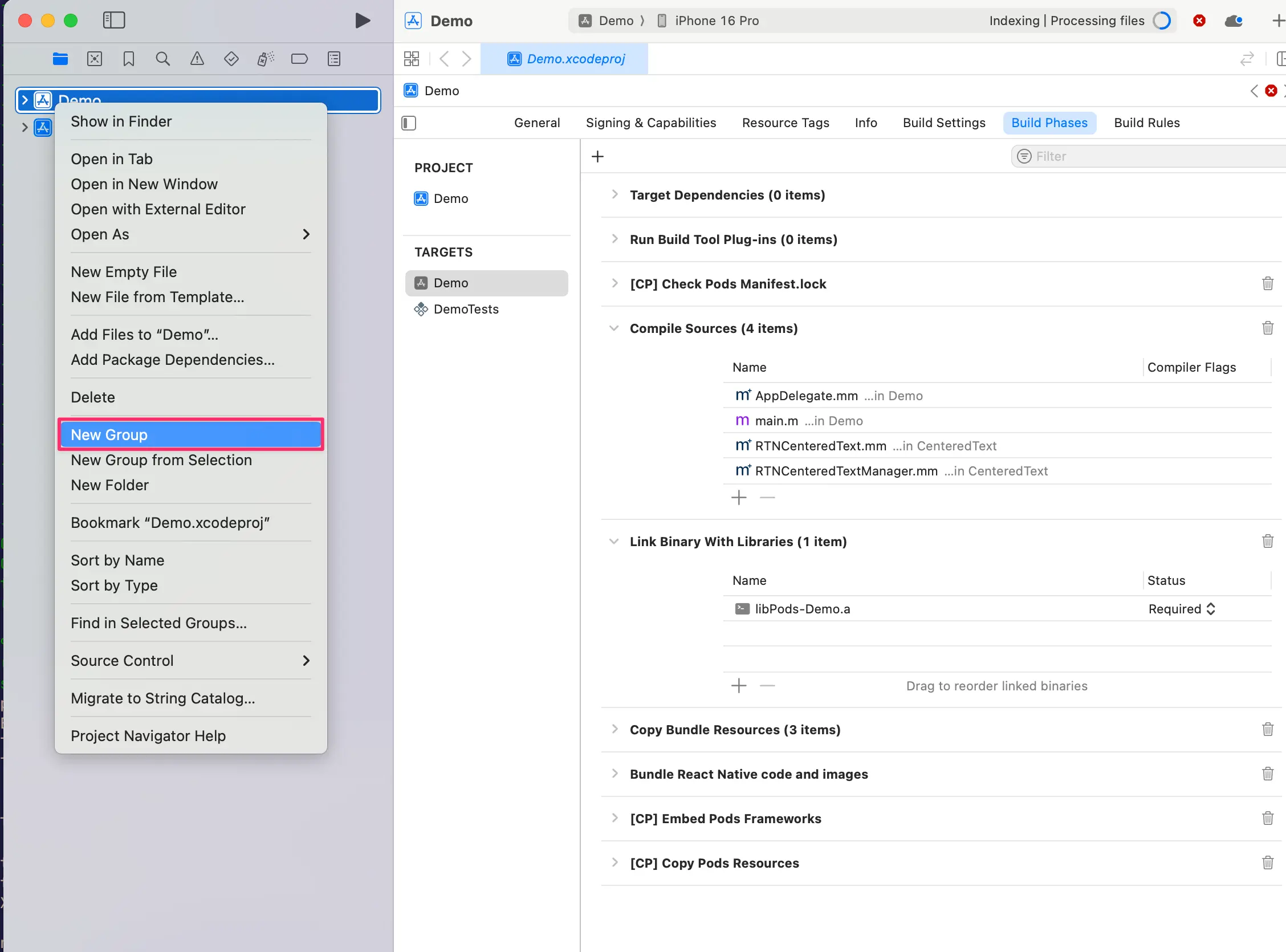
- 右键点击 app 并选择
New Group,将新组命名为WebView。
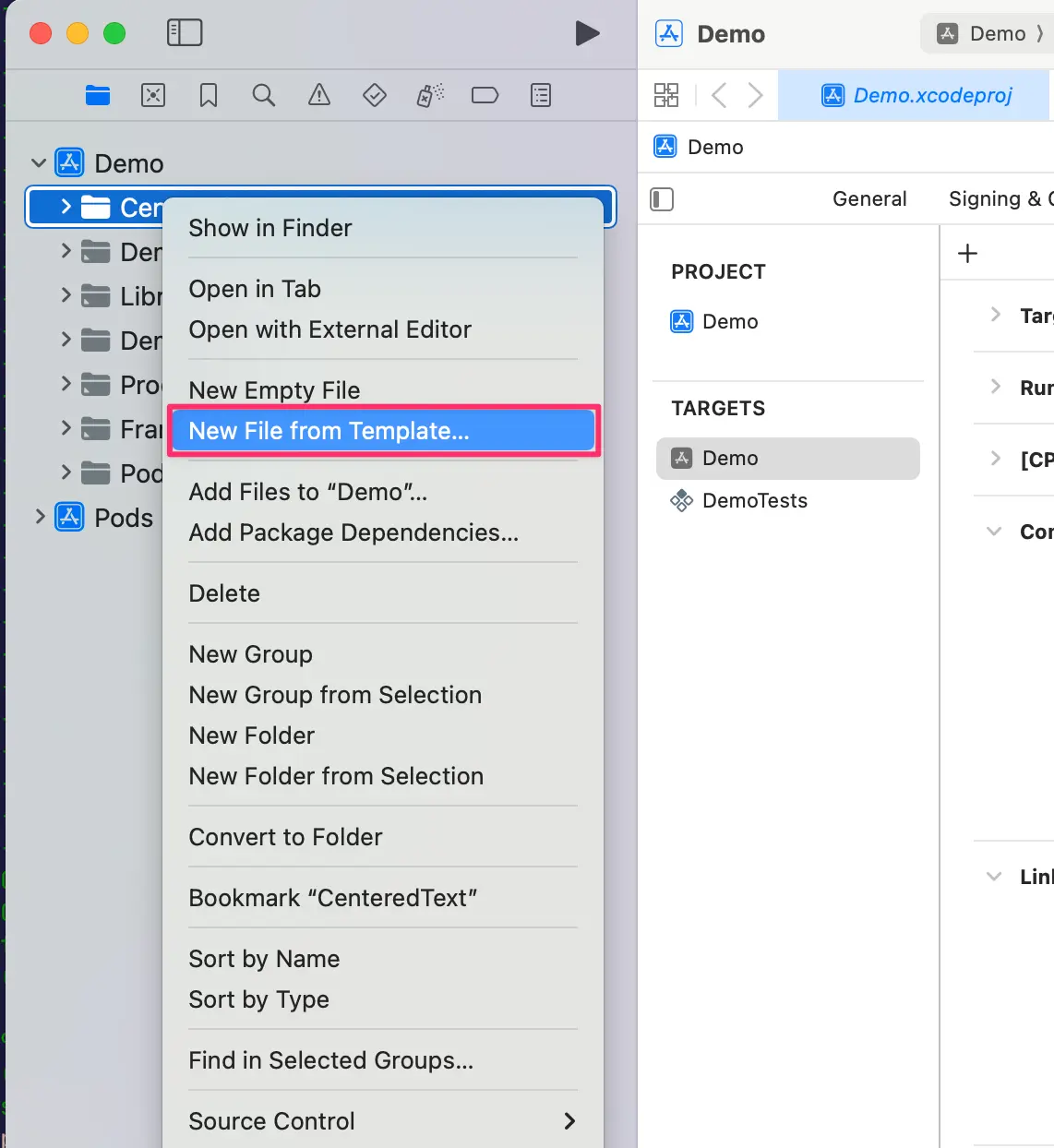
- 在
WebView组中,创建New→File from Template。
- 使用
Objective-C File模板,并将其命名为RCTWebView。
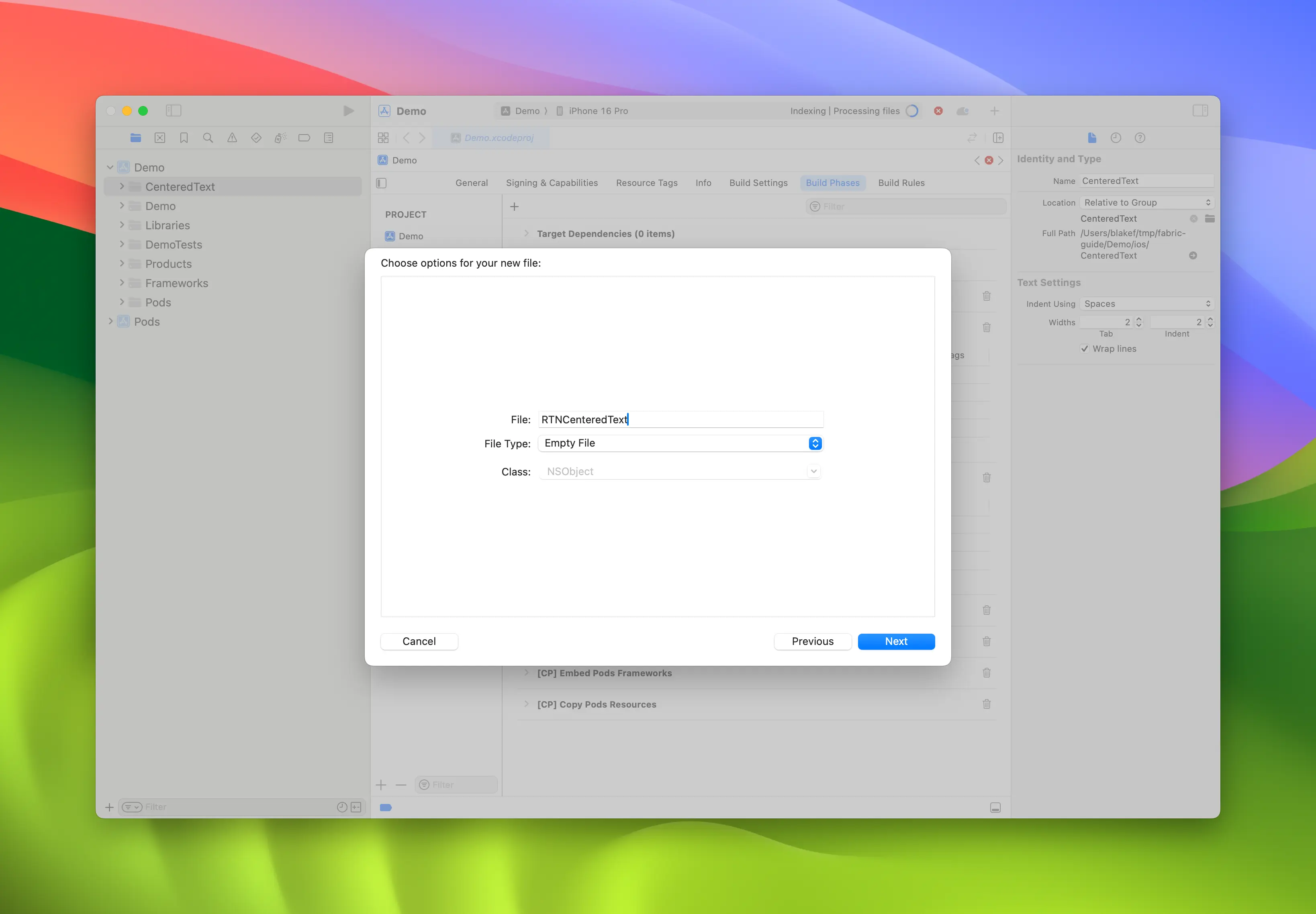
-
重复步骤 4 并创建一个名为
RCTWebView.h的头文件。 -
重命名
RCTWebView.m→RCTWebView.mm使其成为 Objective-C++ 文件。
Podfile
...
Demo
├── AppDelegate.swift
...
├── RCTWebView.h
└── RCTWebView.mm
创建头文件和实现文件后,你可以开始实现它们。
这是 RCTWebView.h 文件的代码,它声明了组件接口。
#import <React/RCTViewComponentView.h>
#import <UIKit/UIKit.h>

NS_ASSUME_NONNULL_BEGIN

@interface RCTWebView : RCTViewComponentView

// 你可以在这里声明你想从视图访问的原生方法

@end

NS_ASSUME_NONNULL_END
这个类定义了一个 RCTWebView,它扩展了 RCTViewComponentView 类。这是所有原生组件的基类,由 React Native 提供。
实现文件 (RCTWebView.mm) 的代码如下:
#import "RCTWebView.h"

#import <react/renderer/components/AppSpec/ComponentDescriptors.h>
#import <react/renderer/components/AppSpec/EventEmitters.h>
#import <react/renderer/components/AppSpec/Props.h>
#import <react/renderer/components/AppSpec/RCTComponentViewHelpers.h>
#import <WebKit/WebKit.h>

using namespace facebook::react;

@interface RCTWebView () <RCTCustomWebViewViewProtocol, WKNavigationDelegate>
@end

@implementation RCTWebView {
  NSURL * _sourceURL;
  WKWebView * _webView;
}

-(instancetype)init
{
  if(self = [super init]) {
    _webView = [WKWebView new];
    _webView.navigationDelegate = self;
    [self addSubview:_webView];
  }
  return self;
}

- (void)updateProps:(Props::Shared const &)props oldProps:(Props::Shared const &)oldProps
{
  const auto &oldViewProps = *std::static_pointer_cast<CustomWebViewProps const>(_props);
  const auto &newViewProps = *std::static_pointer_cast<CustomWebViewProps const>(props);

  // 在这里处理你的 props
  if (oldViewProps.sourceURL != newViewProps.sourceURL) {
    NSString *urlString = [NSString stringWithCString:newViewProps.sourceURL.c_str() encoding:NSUTF8StringEncoding];
    _sourceURL = [NSURL URLWithString:urlString];
    if ([self urlIsValid:newViewProps.sourceURL]) {
      [_webView loadRequest:[NSURLRequest requestWithURL:_sourceURL]];
    }
  }

  [super updateProps:props oldProps:oldProps];
}

-(void)layoutSubviews
{
  [super layoutSubviews];
  _webView.frame = self.bounds;

}

#pragma mark - WKNavigationDelegate

-(void)webView:(WKWebView *)webView didFinishNavigation:(WKNavigation *)navigation
{
  CustomWebViewEventEmitter::OnScriptLoaded result = CustomWebViewEventEmitter::OnScriptLoaded{CustomWebViewEventEmitter::OnScriptLoadedResult::Success};
  self.eventEmitter.onScriptLoaded(result);
}

- (BOOL)urlIsValid:(std::string)propString
{
  if (propString.length() > 0 && !_sourceURL) {
    CustomWebViewEventEmitter::OnScriptLoaded result = CustomWebViewEventEmitter::OnScriptLoaded{CustomWebViewEventEmitter::OnScriptLoadedResult::Error};

    self.eventEmitter.onScriptLoaded(result);
    return NO;
  }
  return YES;
}

// 事件发射器便捷方法
- (const CustomWebViewEventEmitter &)eventEmitter
{
  return static_cast<const CustomWebViewEventEmitter &>(*_eventEmitter);
}

+ (ComponentDescriptorProvider)componentDescriptorProvider
{
  return concreteComponentDescriptorProvider<CustomWebViewComponentDescriptor>();
}

@end
这段代码是用 Objective-C++ 编写的,包含各种细节:
@interface实现了两个协议:RCTCustomWebViewViewProtocol,由 Codegen 生成;WKNavigationDelegate,由 WebKit 框架提供以处理 web 视图导航事件;
init方法,实例化WKWebView,将其添加到子视图并设置navigationDelegate;updateProps方法,当组件的 props 更改时由 React Native 调用;layoutSubviews方法,描述自定义视图需要如何布局;webView:didFinishNavigation:方法,让你处理当WKWebView完成页面加载时要做什么;urlIsValid:(std::string)propString方法,检查作为 prop 接收的 URL 是否有效;eventEmitter方法,这是一个用于检索强类型eventEmitter实例的工具componentDescriptorProvider,返回由 Codegen 生成的ComponentDescriptor;
添加 WebKit 框架
此步骤仅是因为我们要创建 Web 视图才需要。iOS 上的 Web 组件需要链接到 Apple 提供的 WebKit 框架。如果你的组件不需要访问 Web 特定功能,你可以跳过此步骤。
Web 视图需要访问 Apple 通过 Xcode 和设备附带的一个框架提供的一些功能:WebKit。
你可以在原生代码中通过 RCTWebView.mm 中添加的 #import <WebKit/WebKit.h> 行看到它。
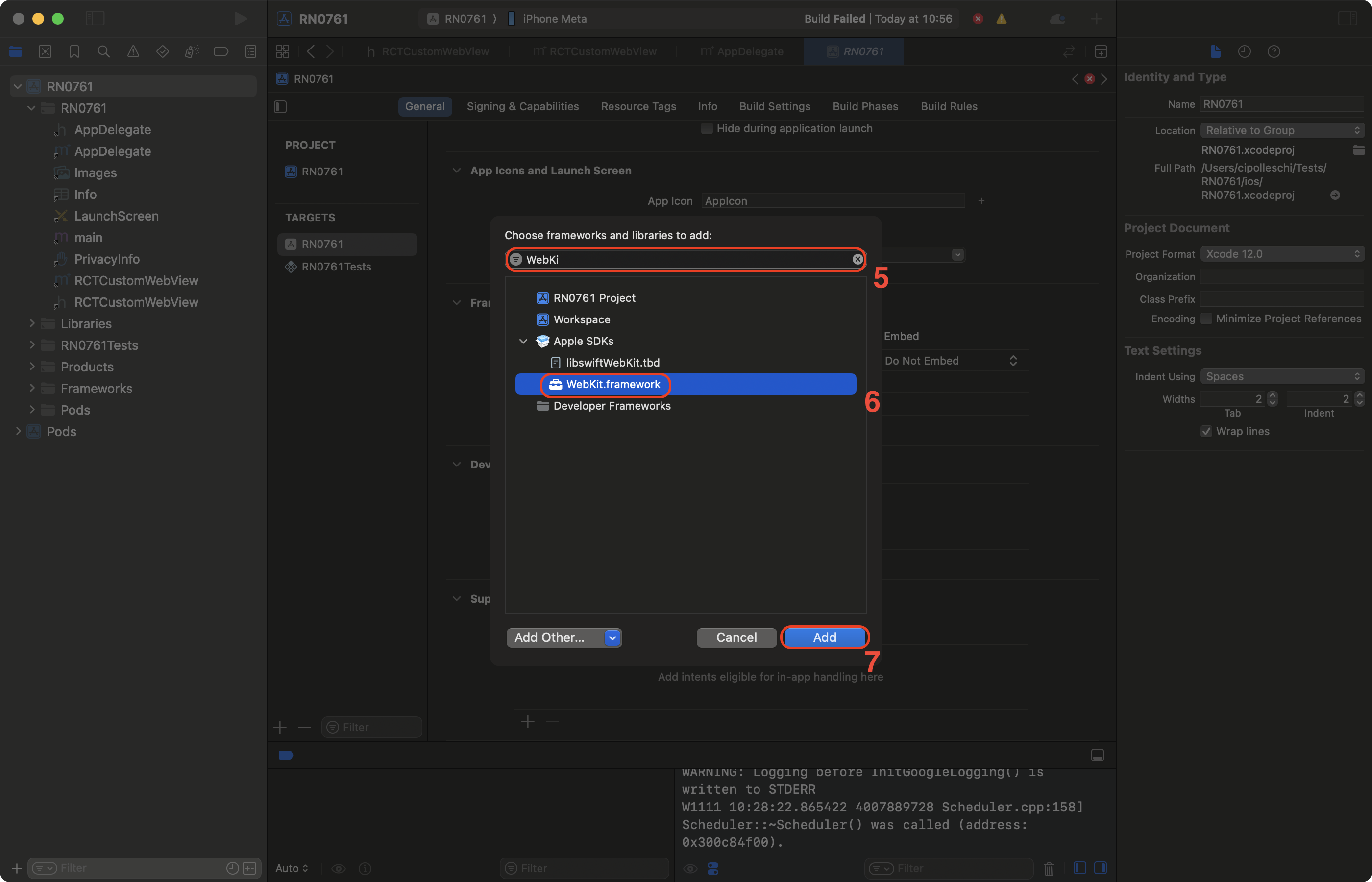
要在你的应用中链接 WebKit 框架,请遵循以下步骤:
- 在 Xcode 中,点击你的项目
- 选择 app target
- 选择 General 标签页
- 向下滚动直到找到 "Frameworks, Libraries, and Embedded Contents" 部分,然后点击
+按钮
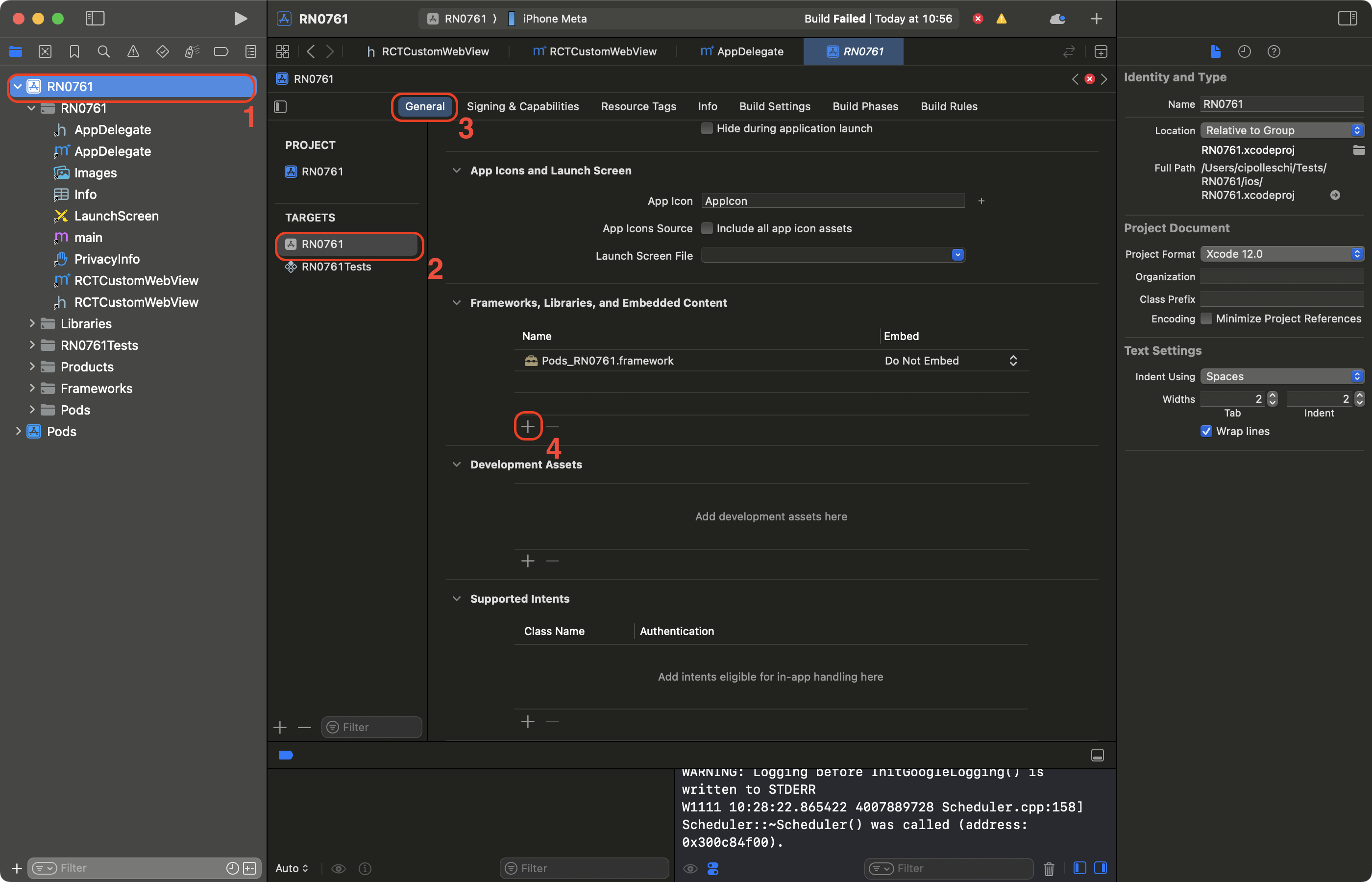
- 在搜索栏中,过滤 WebKit
- 选择 WebKit 框架
- 点击 Add。